All comparisons

Notion vs Jira

Notion suits teams that want documents, wikis, and project databases together, with flexibility to design their own work-management structure. Jira suits teams that need configurable work types, enforced workflows, granular access, and planning across business and engineering work.

Notion

Best for teams combining project work with documents and a custom knowledge workspace

  • Advantage: Can keep documents, task tables, and discussions together on a page.
  • Advantage: Can add fields for status, people, dates, calculations, and links to other records.
  • Advantage: Can create public forms linked to database properties so responses become records; basic forms are available on all plans.
  • Limitation: Cannot require permissions or specific field values for each status change.
  • Limitation: Can build cross-project views using linked databases, summaries, and charts, but needs setup.

Jira

Best for teams that need configurable work models, enforced workflows, and connected delivery planning

  • Advantage: Configurable workflows can restrict transitions, require information, validate changes, and run follow-up actions.
  • Advantage: Software spaces provide backlogs for ranking, estimating, and scheduling upcoming work.
  • Advantage: Can reuse managed work-type and workflow schemes across company-managed spaces.
  • Limitation: Can connect Jira work to Confluence documents; the full document workspace is supplied by Confluence rather than Jira alone.
  • Limitation: Company-managed boards group columns by status and can add swimlanes by query, story, assignee, epic, or space.

Feature comparison

✓ Supported · — Partially supported · × Not available.

Feature Notion Jira
Pricing
Starting paid price Compare the entry paid plan, billing unit, and payment commitment.
From $10/seat/month, billed annually (Plus).
Jira Standard starts at $7.91 per user/month on the current monthly pricing example. Actual prices vary by user count, billing cycle, and region.
Free plan Compare what teams can use before moving to a paid plan.
Free includes unlimited pages for individuals; collaborative workspaces have a block allowance and ten external guests.
The Free plan covers up to 10 users with 2 GB storage, community support, and lower automation limits. Permissions, external collaboration, and other controls require a paid plan.
Work structure and knowledge
Projects, tasks, and subtasks Organise work from individual tasks through projects and larger initiatives.
Supported
Supported
Custom fields Track information that is specific to the team’s work.
Supported
Supported
Custom work types Model different kinds of work with their own structure and fields.
Limited Can model different work using database properties and templates; work types are team-designed database structures.
Supported
Documents and knowledge Keep project documentation and long-form knowledge connected to tasks.
Supported
Limited Can connect Jira work to Confluence documents; the full document workspace is supplied by Confluence rather than Jira alone.
Whiteboards Connect visual brainstorming to project work.
Limited Can embed live Miro boards; visual collaboration takes place in the connected Miro workspace.
Limited Can create and import Jira work on Confluence whiteboards; Confluence is the companion product.
Views and everyday work
Board and list layouts Switch between a board and a list of the same work.
Supported
Supported
Grouping by field Organise views by status, owner, or another work-item field.
Supported
Supported
Cross-project views View work from several projects or teams together.
Limited Can bring project records together through linked databases and views; teams need a shared database model or linked structure.
Supported
Advanced filters Build precise views from several conditions.
Supported
Supported
Saved and shared views Save board or list settings and share them with other people.
Supported
Supported
Keyboard navigation and commands Navigate and act without reaching for the mouse.
Supported
Supported
Bulk editing Update several selected work items together.
Supported
Supported
Planning and reporting
Planning across teams Connect current delivery work with broader projects, initiatives, and plans.
Limited Can build cross-project views using linked databases, summaries, and charts, but needs setup. Inherited from jira-vs-notion, Planning and views: Cross-team plans. Sources were attributed at page level in the original comparison; claim-specific attribution needs review.
Supported
Progress reporting Understand delivery progress and performance through reports.
Limited Can build progress views using charts, rollups, and database properties; delivery reporting needs a designed database model.
Supported
Task dependencies Track blocking relationships between tasks and projects.
Supported
Supported
Workload and capacity Compare assigned work with team availability and capacity.
Limited Can group assignments and calculate workload using database properties and rollups; availability-aware capacity planning needs custom setup.
Supported
Goals and objectives Connect tasks and project progress to organisational goals.
Limited Can model objectives and link them to work through related databases and rollups; teams configure the goal-tracking structure.
Supported
Time tracking Record time spent on work and review it in reports.
Limited Can store time values and calculate summaries with properties and rollups; a dedicated live timer needs a separate implementation.
Supported
Sprint planning Plan repeating delivery periods with a backlog and sprint scope.
Supported
Supported
Sprint reporting Review burndown, velocity, and delivery trends with dedicated reports.
Limited Can track sprint work using task databases, charts, and formulas; formal velocity and burndown reporting needs setup.
Supported
Timeline and Gantt views Plan work against dates and see schedules and dependencies in a timeline or Gantt view.
Limited Can show database items on a timeline and adjust linked task dates; dependency-aware scheduling is built on database relations.
Supported
Backlog management Maintain an ordered backlog and select work for upcoming delivery periods.
Limited Can organise tasks and assign current or future sprints in databases; teams configure the backlog views.
Supported
Workflow and intake
Automatic actions React to changes and automate multi-step processes.
Supported
Supported
Rules for changing status Enforce allowed status transitions and require information before work can move to another stage.
Not available
Supported
Request forms Collect structured requests that create work items.
Supported
Supported
Custom statuses Define the stages that match each team’s process.
Supported
Supported
Approval steps Require approval from designated people before work can proceed.
Not available
Supported
Access and administration
Project roles and permissions Control who can view, edit, and administer project work.
Supported
Supported
Individual work-item access Restrict an individual work item within an otherwise shared project.
Limited Can give people access to assigned database records on Business and Enterprise, but broader inherited access still applies. Inherited from jira-vs-notion, Sharing and Jira integration: Private tasks in shared projects. Sources were attributed at page level in the original comparison; claim-specific attribution needs review.
Supported
Shared configuration Reuse managed fields and process settings across teams.
Supported
Supported
Integrations
Development integrations Connect planning with branches, pull requests, builds, and deployments.
Limited Can show Jira development tasks through synced databases and integrations. Inherited from jira-vs-notion, Workflow and automation: Code and release updates. Sources were attributed at page level in the original comparison; claim-specific attribution needs review.
Supported
Jira integration Connect work and updates with Jira projects.
Supported
Supported
API and webhooks Read and update work programmatically and receive events when it changes.
Supported
Supported

Notion

Best for teams combining project work with documents and a custom knowledge workspace

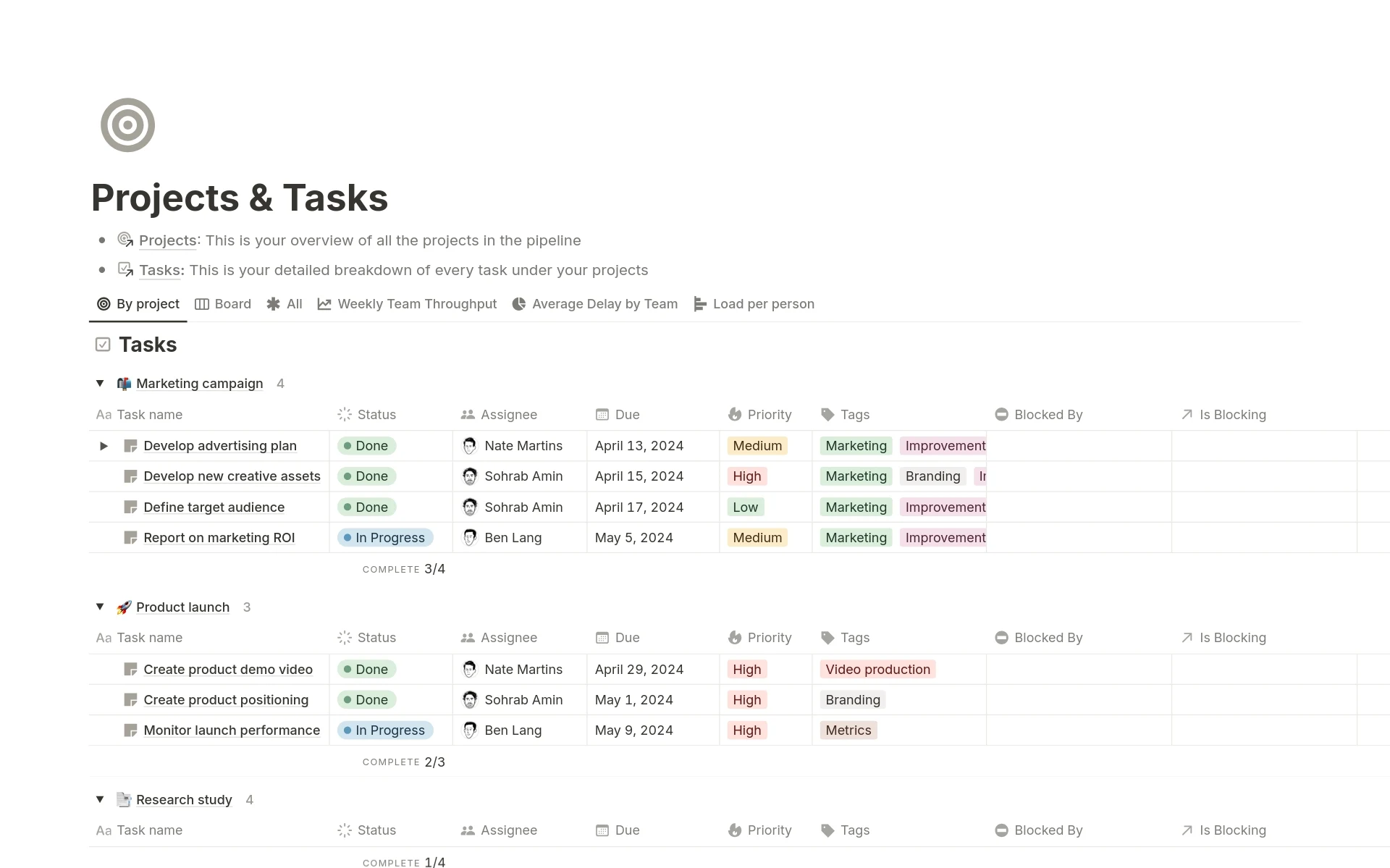
Notion projects and tasks database grouped by project
Notion combines project context and structured task data in a flexible page-based workspace.

Documents alongside project data

Can keep documents, task tables, and discussions together on a page.

Relational project databases

Can link records in different databases and summarise information from the linked records.

Multiple database views

Can view the same database as a table, board, list, timeline, calendar, gallery, chart, or feed.

Configurable task and sprint databases

Can plan current and future sprints in databases and automatically carry unfinished work forward.

Jira

Best for teams that need configurable work models, enforced workflows, and connected delivery planning

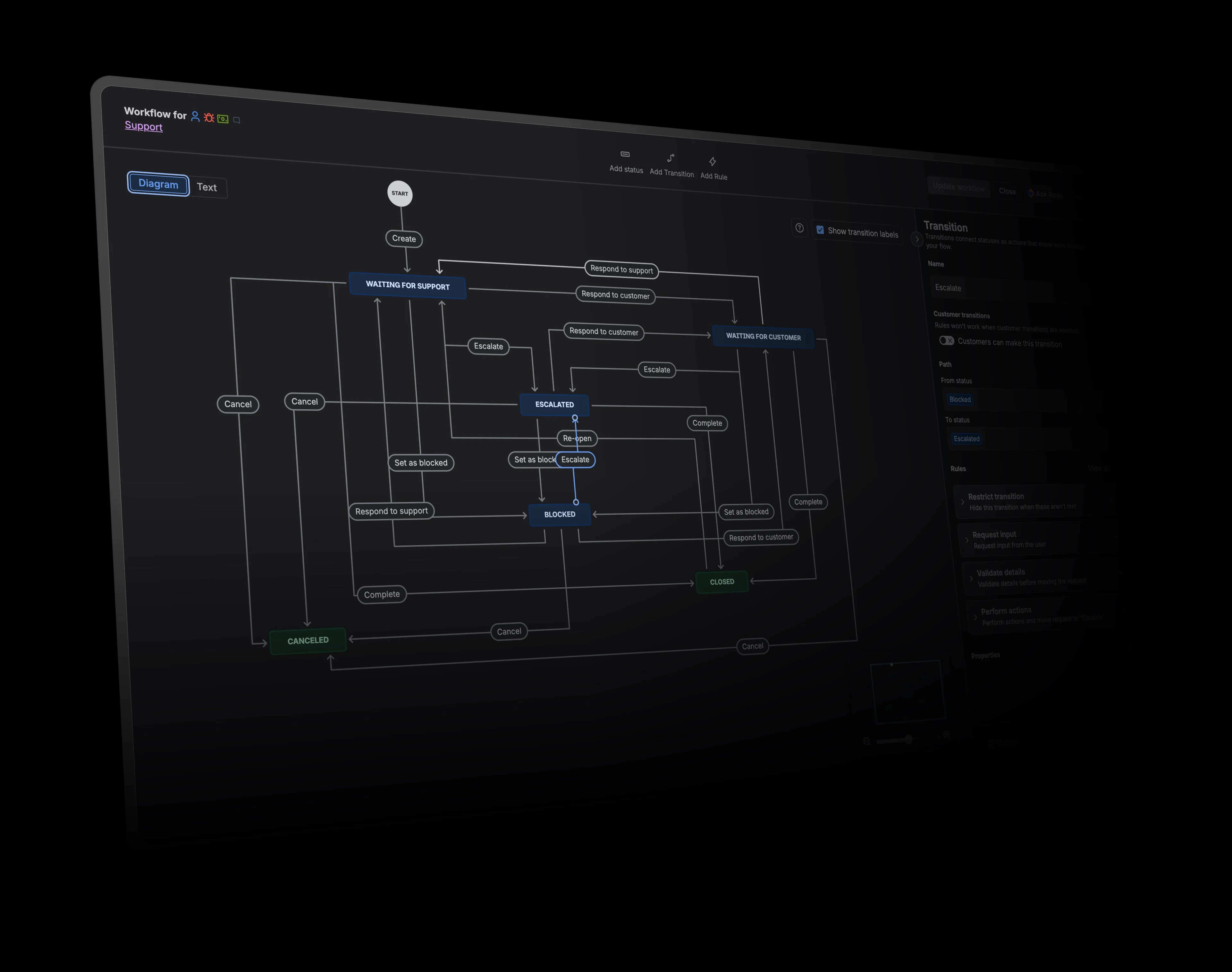
Jira workflow editor showing statuses and transitions
Jira workflows can model detailed statuses, transitions, permissions, validation, and follow-up actions.

Enforced workflow rules

Configurable workflows can restrict transitions, require information, validate changes, and run follow-up actions.

Configurable work types and fields

Administrators can create custom fields and apply contexts so teams capture organisation-specific data.

Connected delivery planning

Backlogs, sprints, releases, timelines, and Plans support short- and long-range planning.

Granular work-item access

Work items inherit space permission schemes and can add issue-level security where configured.

Key differences

Capability
Notion
Jira

Work structure and customisation

Compare how each product models projects, tasks, work types, and team-specific information.

Can group database views by properties and add a second layer of grouping. Can combine database filters with nested AND and OR groups.

Jira supports grouping work by fields, including status columns and assignee swimlanes. Board scope, quick filters, rows, and card colours can use JQL queries.

Workflow configuration

Consider whether the team needs a consistent status model or rules that govern how work moves between stages.

Cannot require permissions or specific field values for each status change. Enforced approval steps are not available in Notion. Can automatically update pages, notify people, send emails, or call other services when something changes or on a schedule.

Configurable workflows can restrict transitions, require information, validate changes, and run follow-up actions. Can embed multiple approval steps into team-managed business workflows on Premium and Enterprise. Rules combine triggers, conditions, branches, smart values, and actions across Jira work.

Access and extensibility

Review the permission model and the options for connecting or extending each product programmatically.

Can give people access to assigned database records on Business and Enterprise, but broader inherited access still applies. Can control page and teamspace access, including access for guests.

Work items inherit space permission schemes and can add issue-level security where configured. Local configuration and plan restrictions apply. Global, space, work-item, and workflow permissions can control viewing, creation, editing, transition, and administration.

Planning and portfolio scope

Consider how near-term execution connects to timelines, initiatives, dependencies, and broader organisational plans.

Can group assignments and calculate workload using database properties and rollups; availability-aware capacity planning needs custom setup. Can build cross-project views using linked databases, summaries, and charts, but needs setup.

Can plan individual work allocations across the Jira site and use team capacity in planning; availability depends on the plan and enabled planning features. Backlogs, sprints, releases, timelines, and Plans support short- and long-range planning.