Released Hub comparisons

Jira vs Canny

Canny gives customers a place to request features and follow progress. Jira gives teams a place to plan and deliver the work. The decision is usually whether to add a dedicated feedback system alongside Jira.

Best for connected work and delivery

Jira

The adaptable system of record connecting product, business, IT, and engineering work through shared data, workflows, automation, and reporting.

  • Advantage: Connect planning and delivery work across teams
  • Advantage: Adapt terminology, views, and workflows to each team
  • Limitation: Customer-facing communication needs a curated layer
Best for customer feedback and voting

Canny

Public feedback boards, votes, and customer segmentation help product teams understand demand. A roadmap and changelog give customers a way to follow what happens next.

  • Advantage: Collect requests before they become delivery work
  • Limitation: Agree ownership between product planning and delivery

Jira and Canny at a glance

Jira Cloud is the baseline here. Jira Product Discovery, Jira Service Management, and Marketplace apps add separate capabilities; they are not assumed to be included in Jira.

Feature Jira Connected work and delivery Canny Customer feedback and voting
Feedback and product decisions
Customer feedback Where customer input is collected.
Neutral: Can track requests as tasks, but a dedicated customer feedback portal needs extra setup or tools.
Neutral: Can collect feature requests and votes, and group feedback by customer type.
Prioritisation How teams decide what matters.
Neutral: Can rank tasks and track priority in fields. Dedicated idea evaluation tools require the separate Jira Product Discovery product.
Neutral: Can analyse and score feedback to help choose which requests to build.
Roadmaps and communication
Roadmaps Who the plan is for.
Neutral: Can show a space timeline; cross-team plans require Premium or Enterprise. Customer-facing roadmaps need separate setup.
Neutral: Can publish a roadmap showing the status of selected ideas.
Product updates How shipped work reaches customers.
Neutral: Can track releases, but turning that information into customer updates needs a separate publishing step.
Neutral: Can publish a customer-facing changelog of shipped improvements.
Delivery and connected tools
Building and delivering work Where teams carry out the work.
Neutral: Can manage tasks, process steps, dependencies, and delivery reports.
Neutral: Can link feedback to delivery work, but engineering teams still use Jira or another delivery tool.
Using both tools How planning connects to delivery.
Neutral: Can keep delivery work in Jira while another product manages customer feedback or plans.
Neutral: Can sync idea status both ways on Pro and Business, with one Jira issue per idea. The older posts integration only syncs status from Jira to Canny.

Where Canny fits better

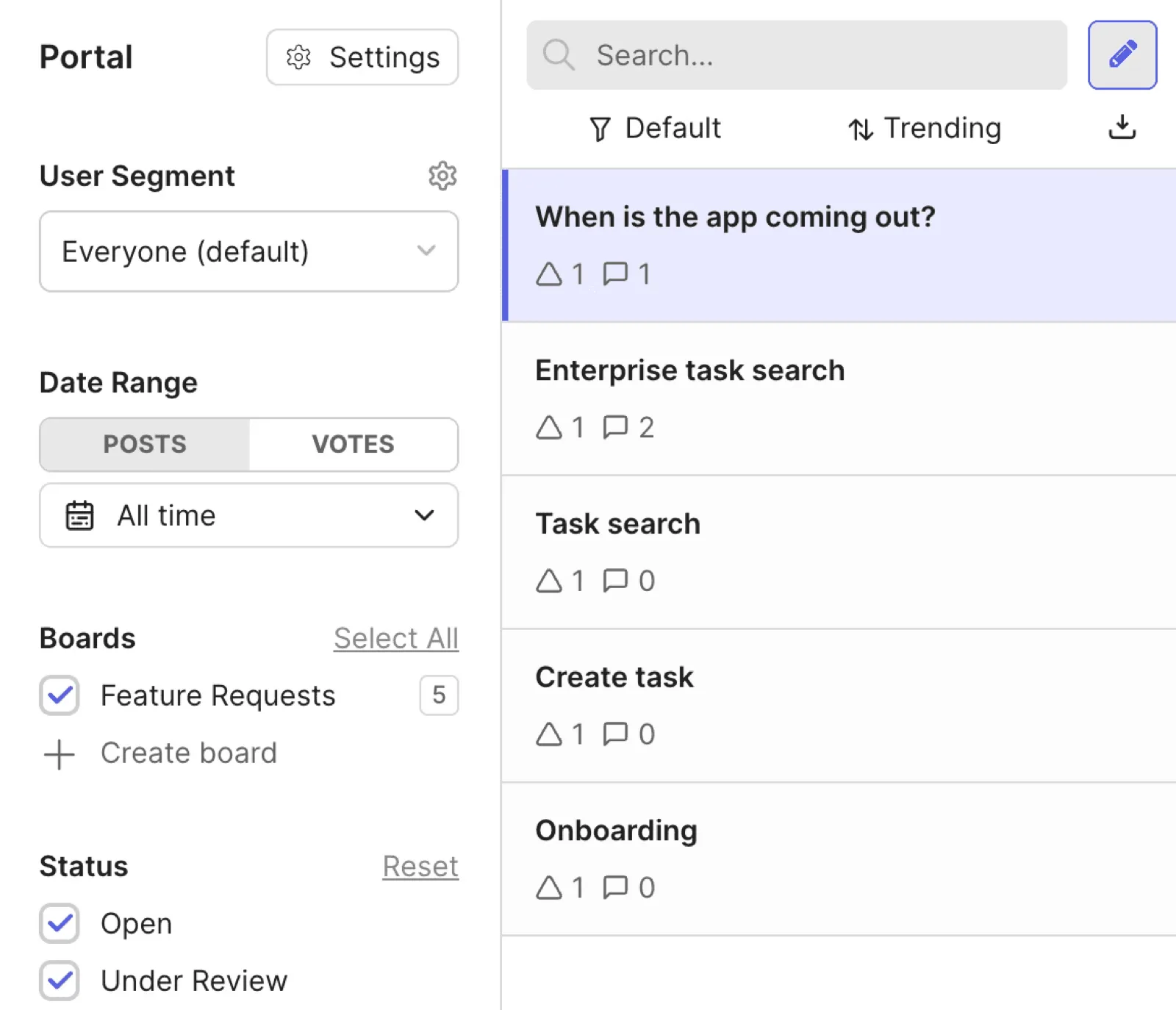
Canny gives customer feedback a dedicated home before it becomes delivery work.

Canny feedback board showing feature requests, votes, comments, and status filters
Canny gives customer requests a dedicated board where users can vote, comment, and follow status.

Where Jira fits better

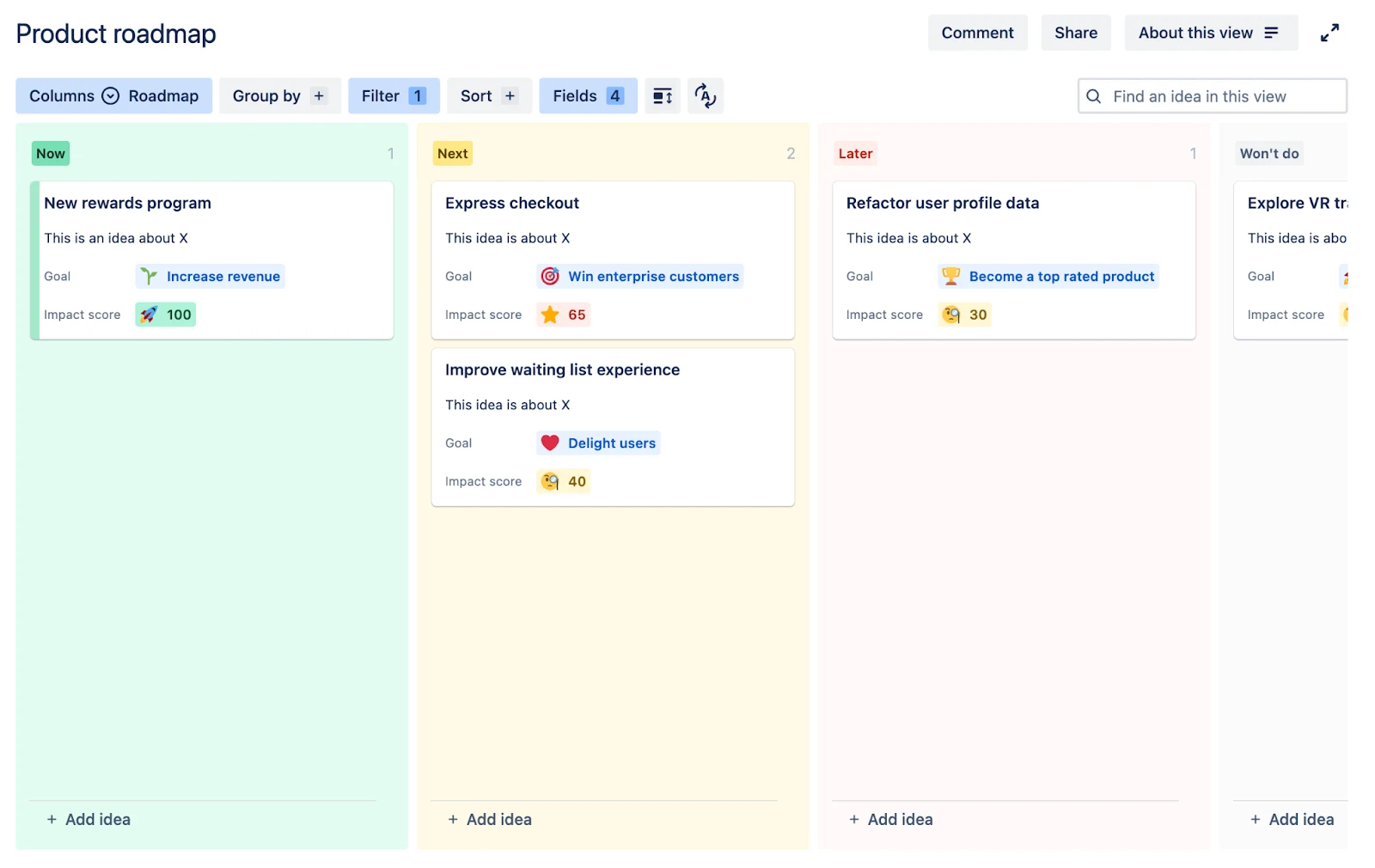
Jira connects the decision to the teams responsible for planning and delivering it.

Jira Product Discovery board connecting product ideas with delivery planning
Jira Product Discovery keeps ideas, evidence, and delivery connections inside the Atlassian system.

Custom fields, permissions, transition rules, automation, sprints, and release context support work that needs more structure than a customer idea or roadmap status.

Workflow comparison

How each setup works

The key decision is where customer feedback lives and how it connects to Jira delivery.

Canny + Jira

  1. Collect feedback, votes, and customer context in Canny.
  2. Send accepted ideas to Jira for planning and delivery.
  3. Sync progress back to Canny and publish roadmap and changelog updates.

Jira + Released Hub

  1. Collect feedback and publish customer-facing roadmaps and updates with Released Hub.
  2. Prioritise opportunities and connect evidence in Jira or Jira Product Discovery.
  3. Plan and deliver the work in Jira using shared workflows and releases.

Choose based on where customer context should live

The decision is whether customer feedback needs its own product backlog or should stay closely connected to Jira.

Use Canny when a public feedback community, voting, and customer segmentation justify a separate idea backlog with its own ownership and status model.

If Jira is already the planning system, add a customer layer when the main need is to collect input and publish selected roadmaps and updates without maintaining another discovery backlog.

Sources and verification

Documentation reviewed September 12, 2026. Documentation research informs this comparison. Product editions, permissions, and rollout availability can affect the experience.