
How to collect customer feedback in Jira and close the loop
Collect customer feedback with Released Hub, connect conversations to Jira work and keep customers in the loop. See when a form, collector or service portal fits instead.
On this page
If your team plans and delivers in Jira, Released Hub gives customers a place to share ideas, discuss them with your team and follow a customer-facing roadmap connected to selected Jira work. If you only need to capture submissions, a public Jira form or embeddable work item collector may be enough. Jira Service Management fits when feedback arrives alongside support requests.
Choosing where feedback comes in is only part of the process. Once it arrives, your team needs to understand the request, decide what to pursue and tell the customer what happened.
Choose how to collect feedback
The right starting point depends on whether you need a simple submission form, a service-request workflow or an ongoing product-feedback conversation.
Released Hub
Product-feedback conversations and a customer-facing roadmap connected to Jira.
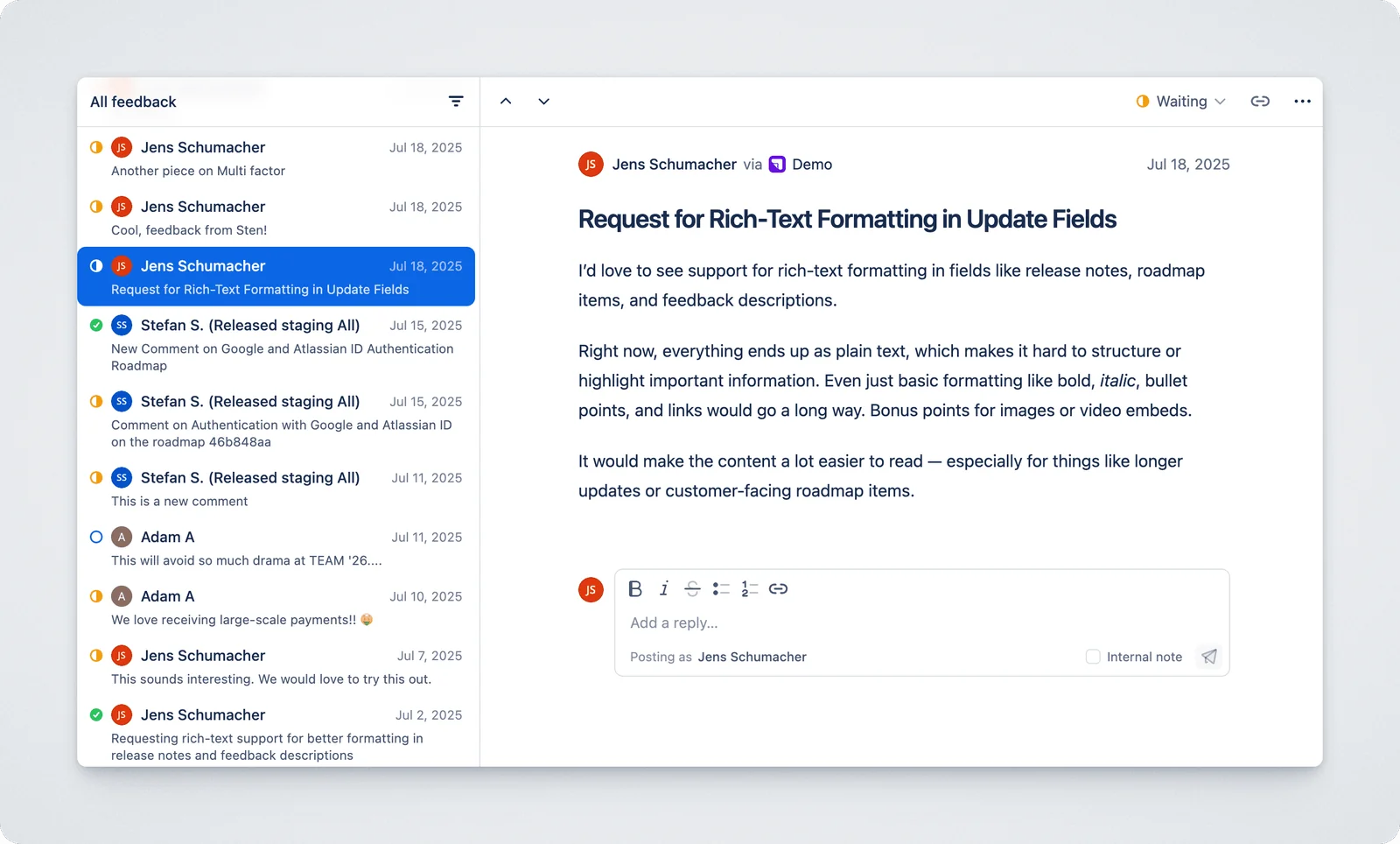
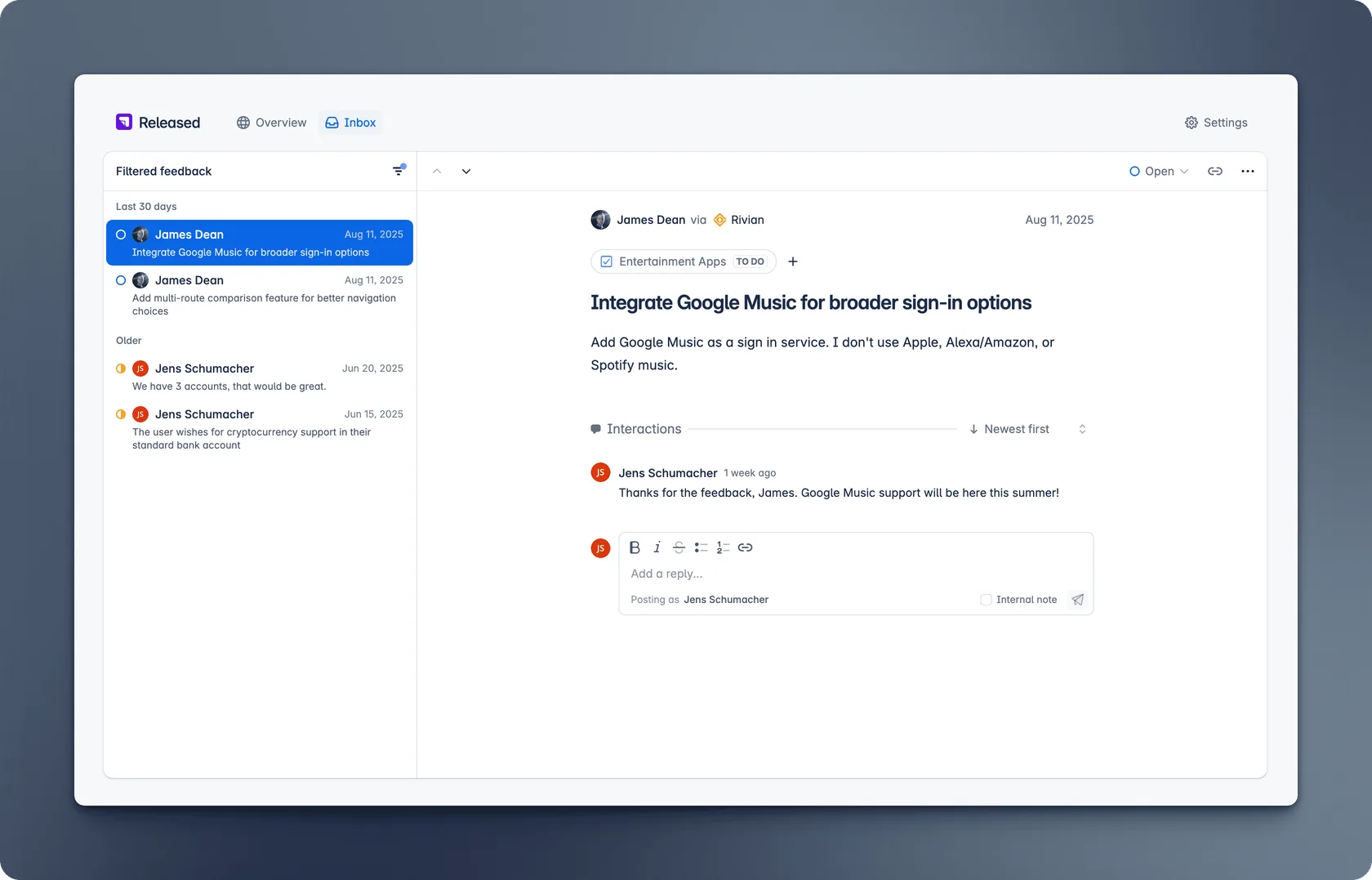
Released Hub feedback gives customers a place to share ideas and discuss them with your team. Its customer portal has a general Give feedback path and, when feedback is enabled, comments on roadmap items. Submissions arrive in an inbox where the team can reply and keep internal notes. See the feedback workflow.
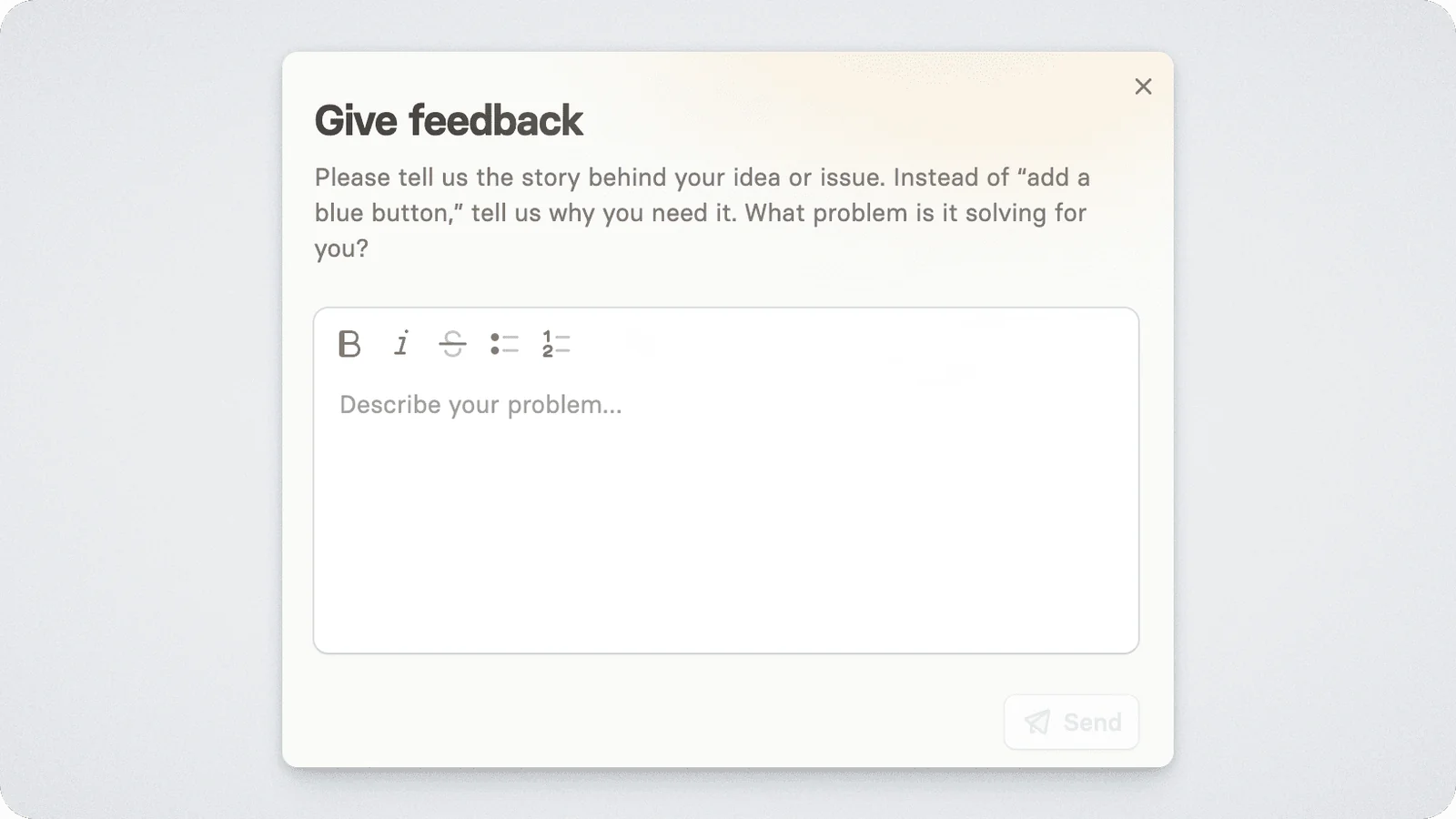
Roadmap comments are linked to their corresponding Jira work item. For general feedback, your team can link the thread to relevant Jira work from the inbox. That distinction matters: a new customer idea does not need to become a separate development ticket before you have understood it.
When you are ready to share a plan, Released Hub roadmaps publish a reviewed customer view of selected Jira work. You can show different levels of detail to different audiences and re-publish when plans change. Released Hub requires Jira Cloud and an app installation; it is a product-feedback workflow, not a replacement for Jira Service Management support queues.
Jira Forms
A shareable link for simple feedback intake.
Jira Forms can gather ideas or feedback and create a work item in the same Jira space when someone submits a response. A space administrator can restrict a form to Jira users or, if public sharing is enabled, let anyone with the link respond. When someone submits a public form without signing in, Jira asks for their email address, records it in a comment on the work item and uses a default reporter. The entered address is not a verified customer profile. To share a form, create it from the space navigation, choose its access level and copy the link. Check the access settings before sharing.
Use this route when a link to a form is enough and your team can triage the resulting work items. A submission is a request to assess, not an automatic commitment to build it. If you need an on-page feedback tab rather than a link, use the collector below.
Making an entire Jira project (now called a space) public is another option on supported paid plans, but it exposes far more than a feedback form. Atlassian says public users do not need a paid Jira seat to view or create work items where the permissions allow it; the risk is what else a public permission scheme reveals. Review public-space permissions before considering that route. For most customer-feedback intake, a form or portal gives you a narrower starting point.
Jira work item collector
An embedded feedback tab on your website or in your app.
The work item collector, often still called the Jira Issue Collector, generates a snippet you can embed on your website or in your app. Visitors can open its feedback dialog without a Jira account; each submission creates a work item in the selected Jira space. You can use its default trigger tab or configure a custom trigger. Atlassian supports it only in company-managed spaces, and setup requires Jira administration access. To set one up, go to the space’s work item collectors, choose the work type and trigger, then embed the generated snippet. See Atlassian’s collector instructions.
Choose it for a simple embedded intake form. You can configure the collector to match an entered email address to a Jira user for the work item’s reporter, but this does not verify the identity of an external customer. The collector does not by itself give customers a product-feedback inbox, public roadmap or ongoing conversation about the request.
Jira Service Management
A service portal for feedback that arrives with support requests.
A help center or portal can present request types with forms, while agents use queues and customer replies to manage each request. Customers submitting requests do not need a paid agent license; agents do. See Atlassian’s access guide.
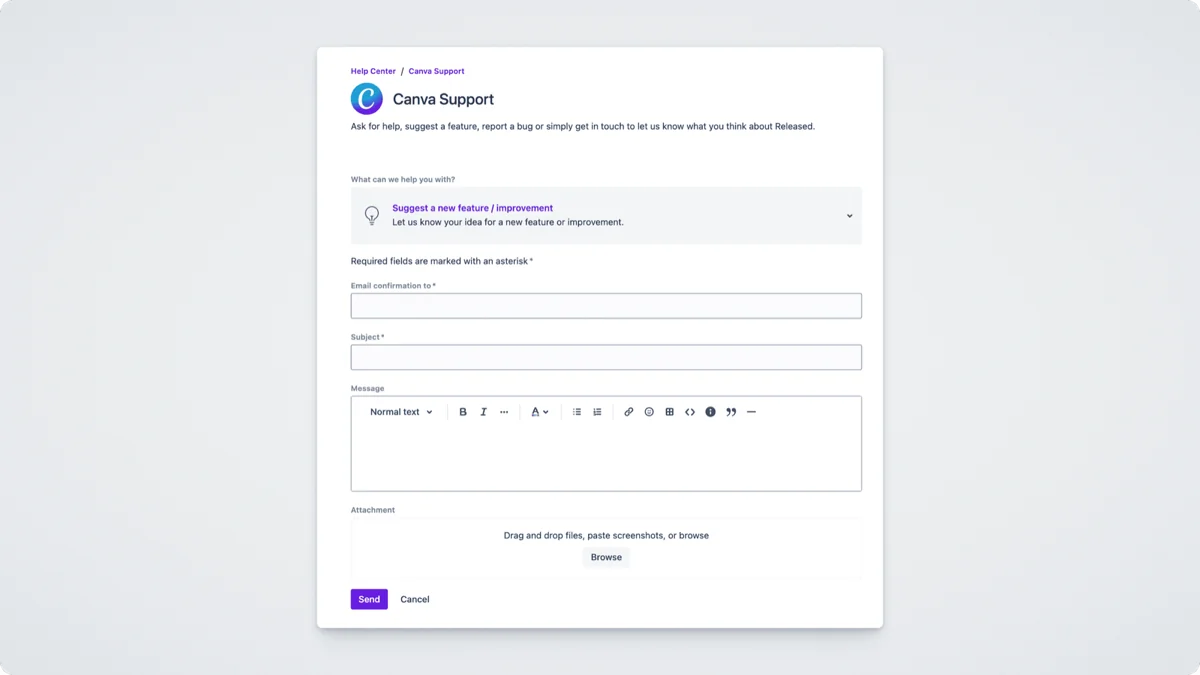
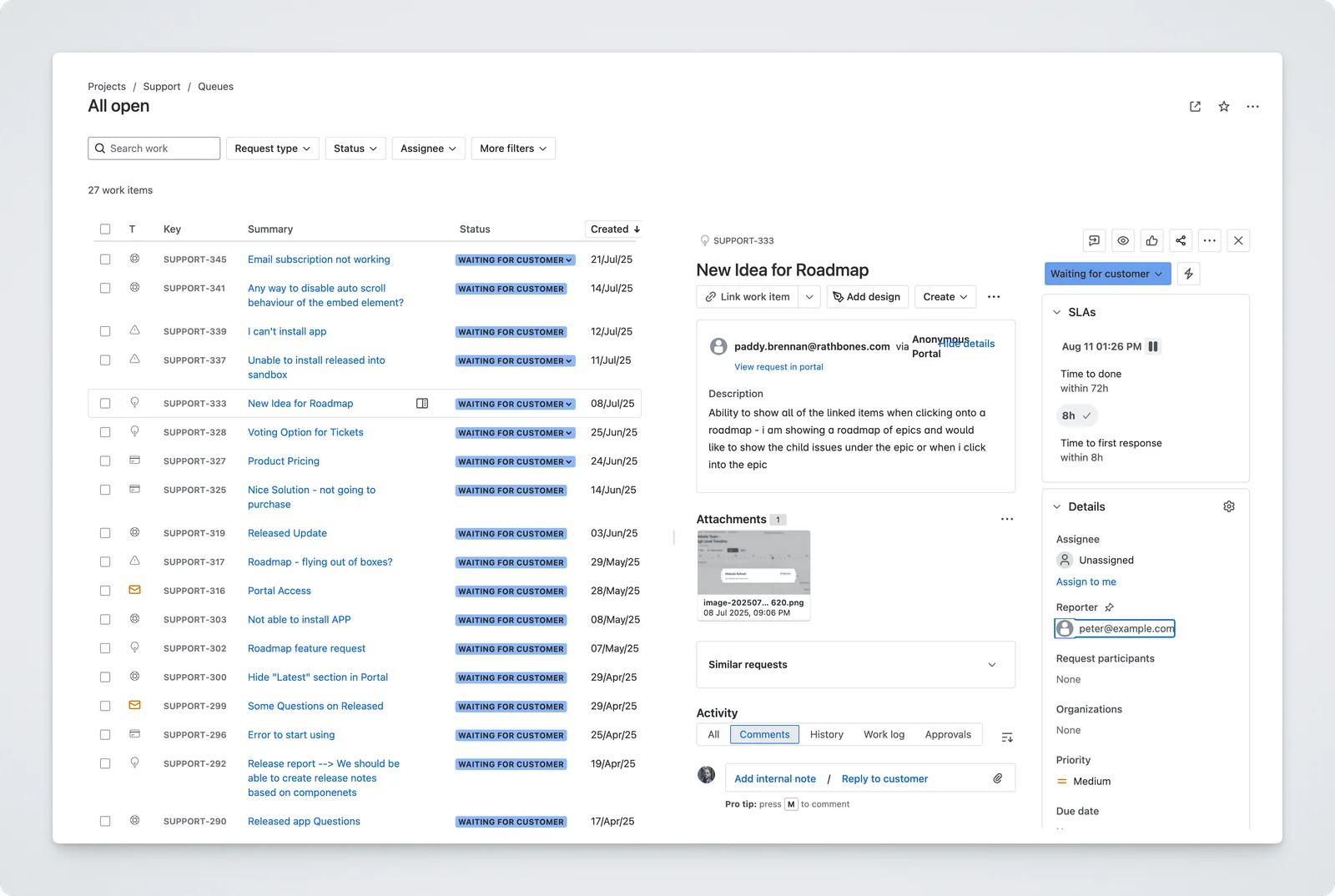
This is a service workflow, not a ready-made public product roadmap. Decide how product requests will be grouped, prioritised and communicated before treating a service ticket as a roadmap item.
From feedback to delivery and follow-up
Collecting a request does not mean committing to build it. First clarify the problem, find related feedback and connect those conversations to existing Jira work or ideas. Then decide what to pursue and follow up with the customer. The example below uses Released Hub to illustrate that workflow; it is not a customer testimonial.
1. Clarify and group related requests
Imagine a customer asks to filter a dashboard by role. Sales may have heard the same need from a prospect, while another customer described it as a permissions problem. Bring those conversations together before prioritising, so the most recent or loudest request does not drive the decision.
In the Released Hub inbox, reply to ask which team needs the filter and what they cannot do today. Search for related feedback, even when customers describe the problem differently. Then link those threads to the same Jira work item or Jira Product Discovery idea, so your team can review the customer context together.
Feedback submitted on a Released Hub roadmap item is linked to its corresponding Jira work item. General feedback can be linked manually from the inbox. See how feedback links to Jira.
2. Decide what to pursue
Use the linked conversations to assess the role-filter problem. How many customers are affected? Which tasks are blocked? Can existing permissions solve it? What would a change cost, and how does its value compare with other opportunities? These answers help you decide whether to investigate further, plan a solution or close the request with an explanation.
If your team uses Jira Product Discovery, RICE scoring gives you a way to compare reach, impact, confidence and effort across ideas. Keep uncertain requests in discovery while you gather evidence. Create or link a Jira work item for delivery once the team chooses a solution, and keep the customer threads attached so the delivery team understands why it matters.
3. Share progress and collect interest
When the idea is ready to communicate, include it in the customer-facing roadmap. Explain the outcome in the public description and review what readers will see before publishing.
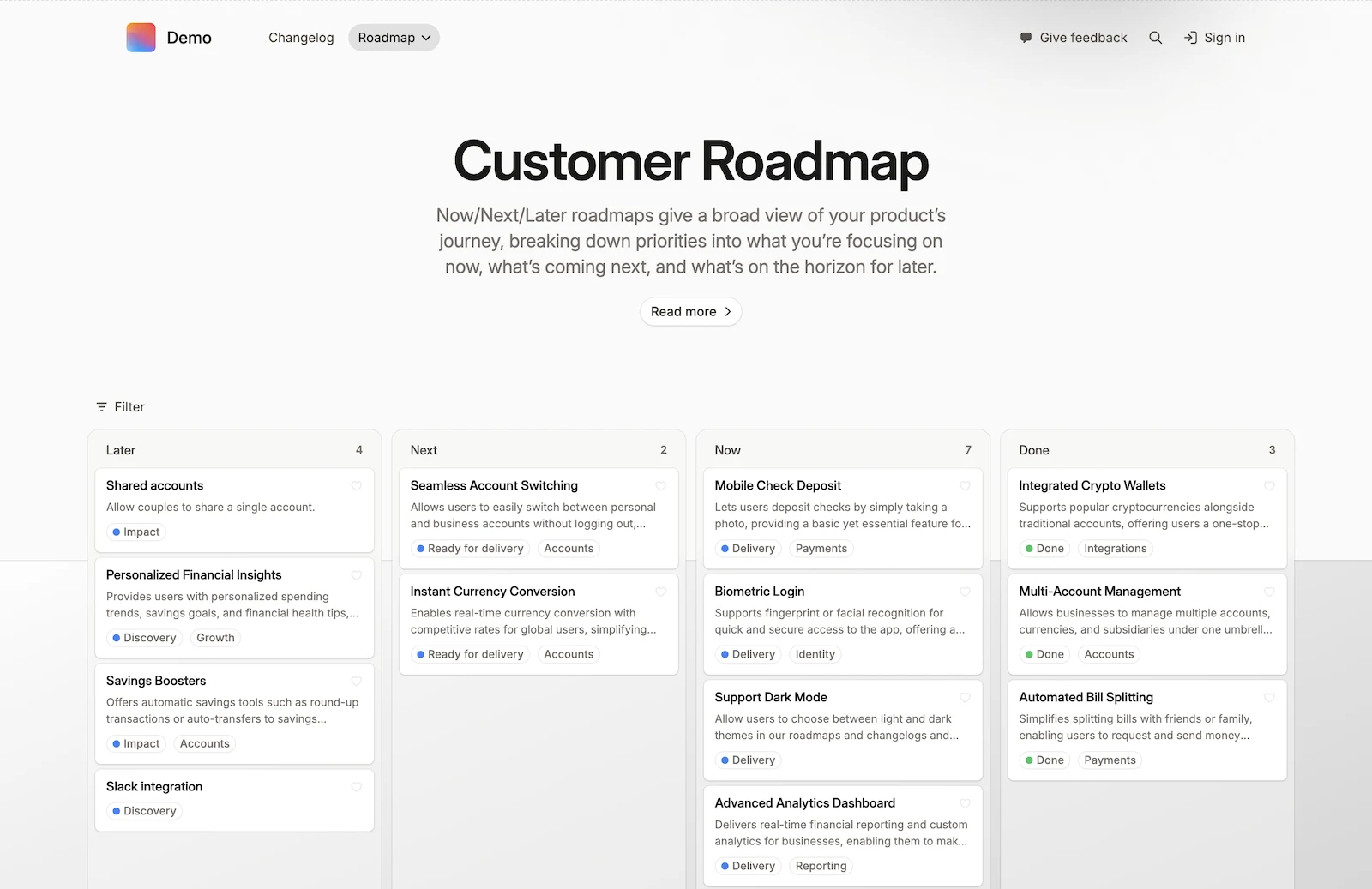
Released Hub’s wishlist feature lets a reader use the heart on a roadmap card to express interest. Wish counts help the team see interest in an item; they are one input to prioritisation, alongside the problem, effort and strategic fit. This is the specific voting-style interaction Released Hub documents, rather than a promise of every feature offered by a general voting platform. See wishlists and their settings.
4. Tell the customer what happened
If the work ships, check that the capability is actually available to the customer. Publish a clear release note and return to the feedback thread with a direct reply, for example: “Role filtering is now available. Choose a role from the dashboard filter menu. Here are the instructions.”
Released Hub’s inbox supports customer replies through the portal or email. Make someone responsible for following up; do not assume that moving a Jira ticket to Done automatically sends that message. The inbox documentation distinguishes customer replies from internal notes.
If the team decides not to build the feature, explain that decision too. A closed conversation should mean the customer understands the outcome, not simply that someone changed a status.
For the announcement itself, use the Jira release-note workflow to turn shipped work into an edited, customer-ready update.
Which approach should you choose?
Choose Released Hub when you want to collect product feedback across channels and connect it to the work your team does in Jira. Host or embed a customer portal, add feedback forms to your site or app, and capture conversations from Slack. Everything flows into one inbox, where customer profiles keep the person behind each request visible. Your team can reply, group related feedback around Jira work items or Jira Product Discovery ideas, share selected work on a customer-facing roadmap, and follow up from the same conversation.
Jira forms give you a simple shareable intake link; the work item collector adds a feedback dialog to your site but works only with company-managed spaces. For external customers, both create Jira work items and rely on entered email addresses rather than verified customer profiles. Jira Service Management adds a portal, queues and agent replies for service requests; grouping product ideas and sharing a roadmap need a separate process. If you are comparing dedicated feedback products, see the customer feedback tools for Jira guide.
The tool does not close the loop for you. Give someone ownership of triage, customer updates and a direct response when the team reaches a decision.
Explore Released Hub feedback or start a free trial in Jira.