
Release Notes vs Changelog: Which Format Works Best for Customer Announcements?
Choose the right format for product updates, from a concise changelog entry to a customer-ready feature announcement, rollout notice, or major launch story.
On this page
The best customer release announcement is rarely one format used for every update. Keep a searchable changelog as the durable record of notable changes. Use a benefit-led release note when customers need to understand a feature or try a new workflow. Send a direct notice when someone needs to act. Reserve a broader launch story for changes that genuinely deserve it.
The deciding factor is customer impact, not how often your team deploys.
Choose the format by customer impact
Routine improvements or grouped fixes
- Format: A concise, categorised changelog entry or periodic roundup.
- Share it when: Subscribers benefit from a summary.
- Include: The customer impact and any relevant limit or known issue.
A new feature or changed workflow
- Format: A release note with a benefit-led headline and one visual.
- Share it when: The right customers need help discovering or adopting it.
- Include: Who it is for, what they can now do, availability, and a clear next step.
An action-required change
- Format: A plain-language notice linked to detailed documentation.
- Share it when: A customer must know, prepare, or complete a task.
- Include: Who is affected, timing, required action, exceptions, and where to get help.
Use this for a migration, deprecation, security change, pricing change, or another update that needs more than awareness.
A major launch
- Format: A launch story supported by a changelog entry, walkthrough, and documentation.
- Share it when: You are reaching customers, prospects, or a broader community.
- Include: The customer problem, outcome, availability, proof, and next step.
This keeps routine product maintenance visible without turning every small fix into a campaign. It also gives major changes the explanation and education they need.
Release notes vs changelogs
A changelog is the compact record: what changed, when it changed, and the details people may need to look up later. It is especially useful for developers, administrators, and customers who need an archive of improvements, fixes, deprecations, and version-specific information. Keep a Changelog is a useful technical convention when that level of detail matters.
A release note is the customer explanation: why the change matters, who it helps, what customers can do now, and how to get started. It should use the customer’s language, not ticket titles or implementation detail.
For a customer-facing feature, use both:
- Put the detailed record in the changelog.
- Lead the release note with the customer outcome.
- Link to current documentation for setup and deeper detail.
That way, readers can quickly understand the update without losing the technical reference they may need later.
Four formats worth using
1. The concise changelog entry
Use this for routine improvements, grouped fixes, or changes that need a reliable home but not a campaign.
- Headline: State the product area and the improvement.
- Body: One or two sentences about the customer impact.
- Detail: Link to documentation only when a reader needs more than the summary.
Good changelog entries are specific enough to be useful and short enough to scan. Categories should match the parts of the product customers recognise, rather than generic labels such as “new feature” and “bug fix.”
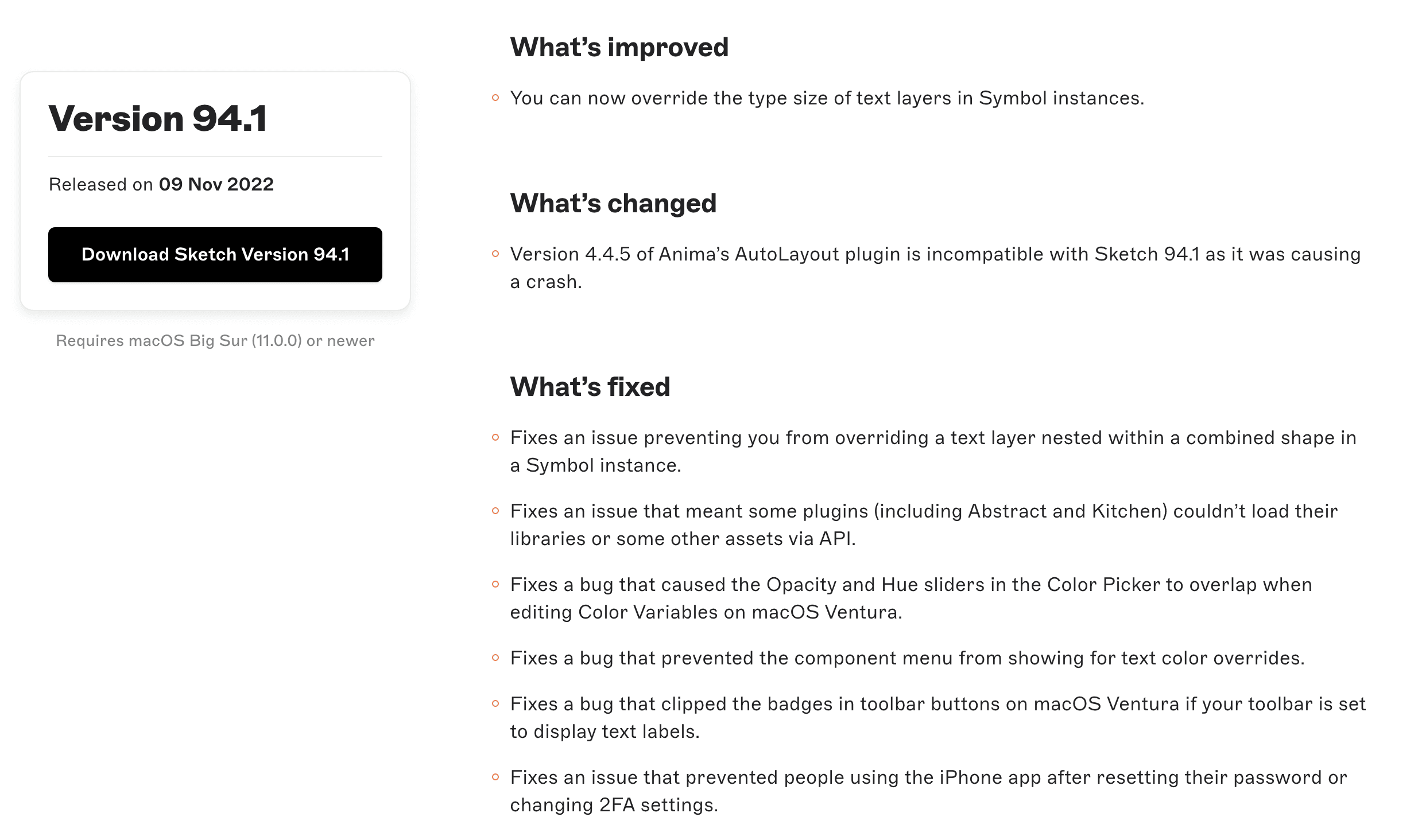
Sketch’s versioned release page shows the pattern clearly: a release identifier, followed by scan-friendly groups for improvements, changes, and fixes.
2. The feature release note
Use this when a new capability changes what customers can do.
Start with the outcome, then show the feature. For example, “Share filtered roadmap views with customers” explains the benefit before the mechanism. Add an annotated screenshot or short walkthrough when the workflow is easier to understand by seeing it.
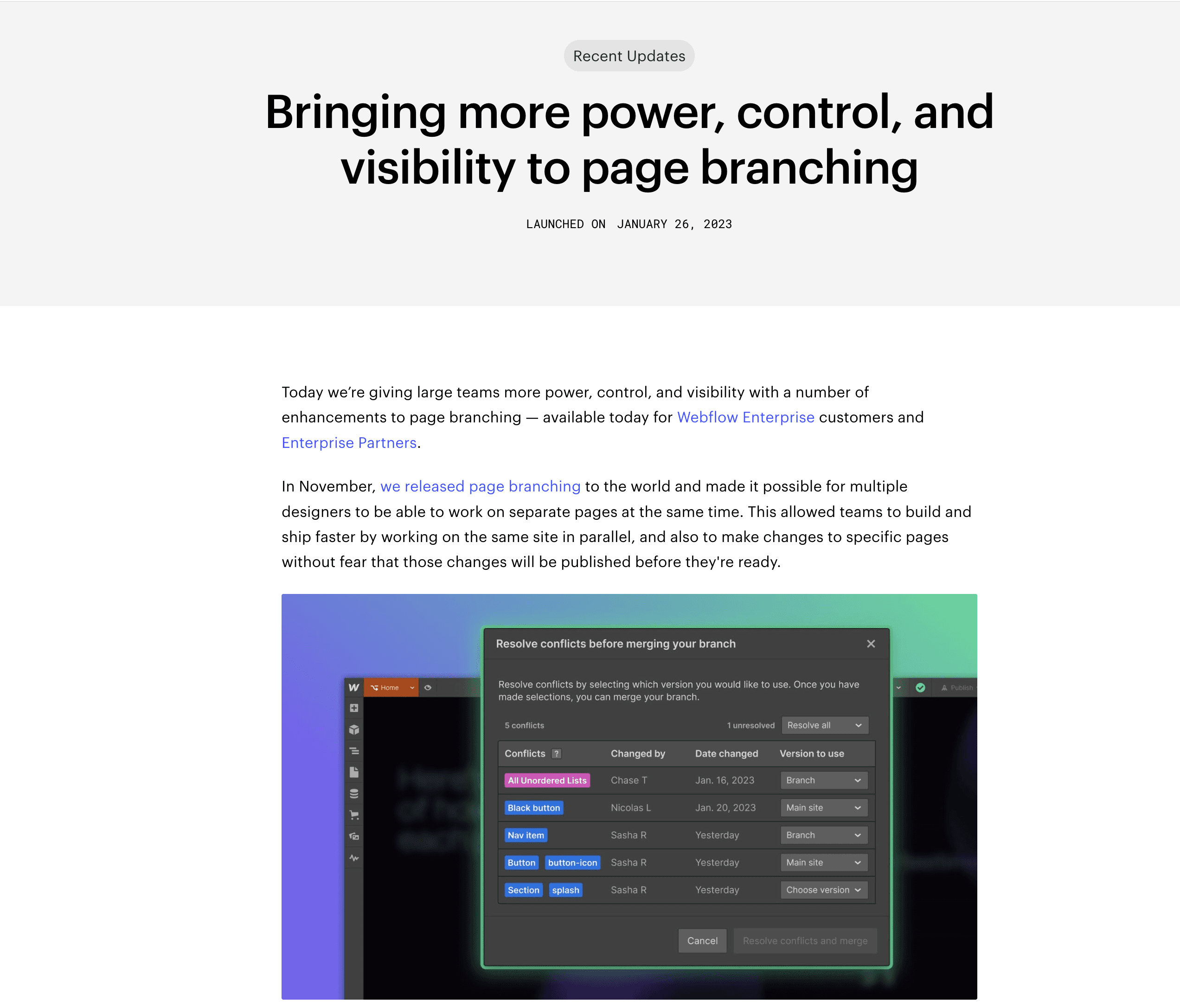
Webflow’s page-branching announcement leads with the customer outcome, availability, and a product visual—useful ingredients for a feature release note.
Answer these questions before publishing:
- Who is this for? Be explicit about role, plan, product area, or requirements.
- What can they do now? Describe the new customer outcome in plain language.
- When is it available? State rollout scope, region, or plan where relevant.
- What should they do next? Link to the feature, a setup guide, or say clearly that no action is needed.
For the structure of an individual post, see our release notes template. For more writing examples, see how to write release notes.
3. The action-required notice
Use a dedicated notice when a customer needs to change something: an administrator must complete setup, an integration is being deprecated, a migration has a deadline, or a security-related change affects their workflow.
This is not the place for launch language. Be direct about what changed, who is affected, what happens if they do nothing, and where they can get help. Put the durable explanation somewhere customers can find again, then communicate directly with the affected audience.
4. The launch package
Use a broader launch only for a major new product, a meaningful product narrative, or a significant new workflow that needs more education than a short update can provide.
The package can include a launch story, a concise changelog entry, current documentation, and a short demo or walkthrough. Each piece should have a different job: the launch story explains the value, the changelog records the release, the documentation enables use, and the walkthrough helps customers picture the workflow.
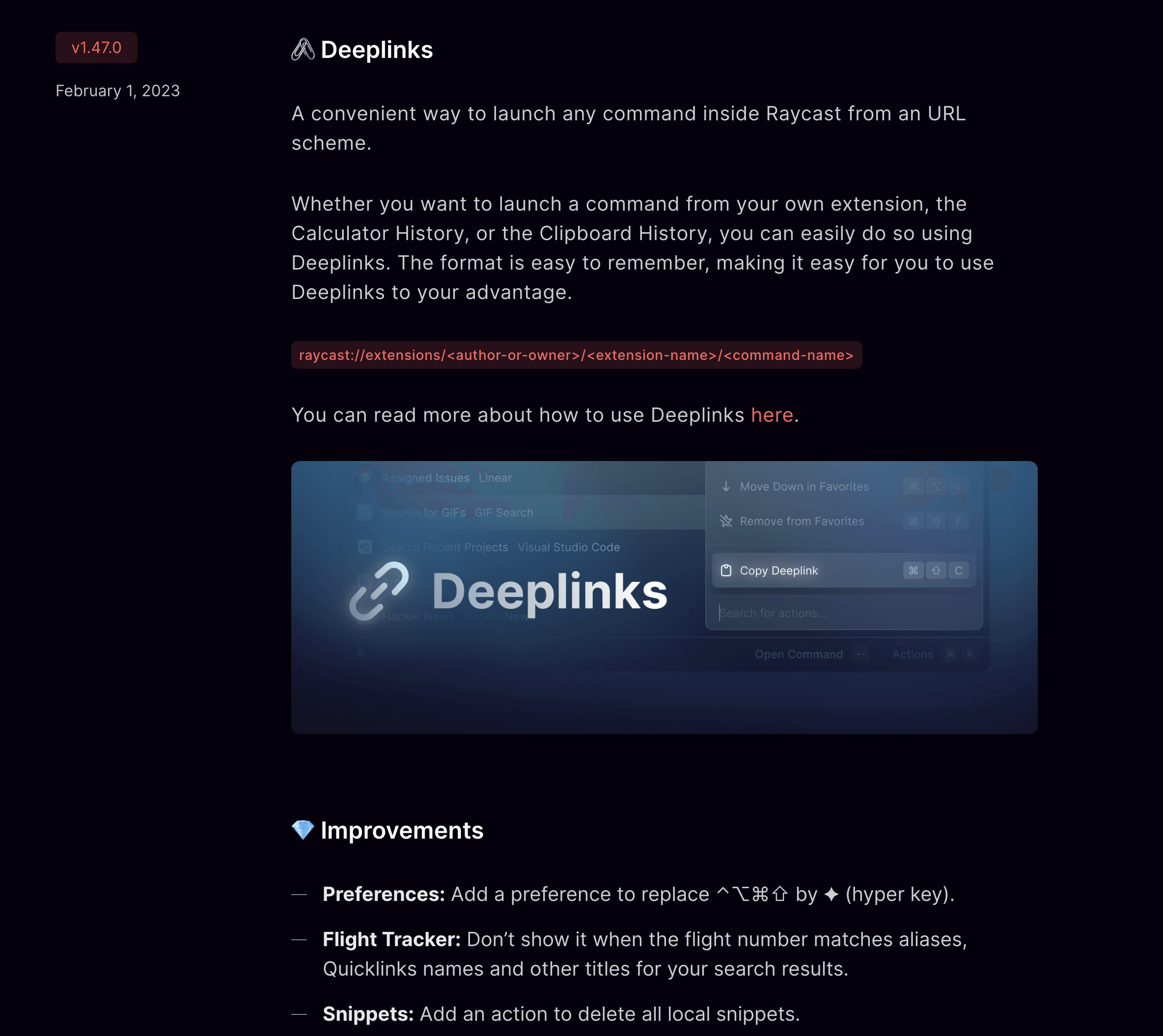
Raycast combines a feature explanation and a short list of improvements in the same update, which can work well when a technical audience wants both the story and the detail.
Put every format where customers will find it
Your changelog is the durable source of truth. It gives customers a link they can bookmark, share with colleagues, or return to when they need to check what changed.
Use a contextual product or website surface to make a relevant update discoverable while someone is already using the product. Use email when awareness or action matters for a particular audience, especially if people may not be active in the product. Use a public launch post or social distribution for a broader product moment, not as the only record of a routine update.
The same approved source material should underpin each version. Do not copy a long changelog into an email or a social post. Summarise the customer outcome for the channel, then point readers back to the full update.
Turn shipped Jira work into the right announcement
The format decision comes after the work is actually ready to share:
- Select the shipped Jira work that customers need to know about.
- Choose the format based on customer impact and required action.
- Draft the customer version: outcome first, then the relevant detail.
- Review production status, availability, accuracy, links, and exclusions before publishing.
- Publish the durable update, then send the appropriate summary to each audience.
For a practical drafting and review workflow, read how to publish release notes from Jira tickets.
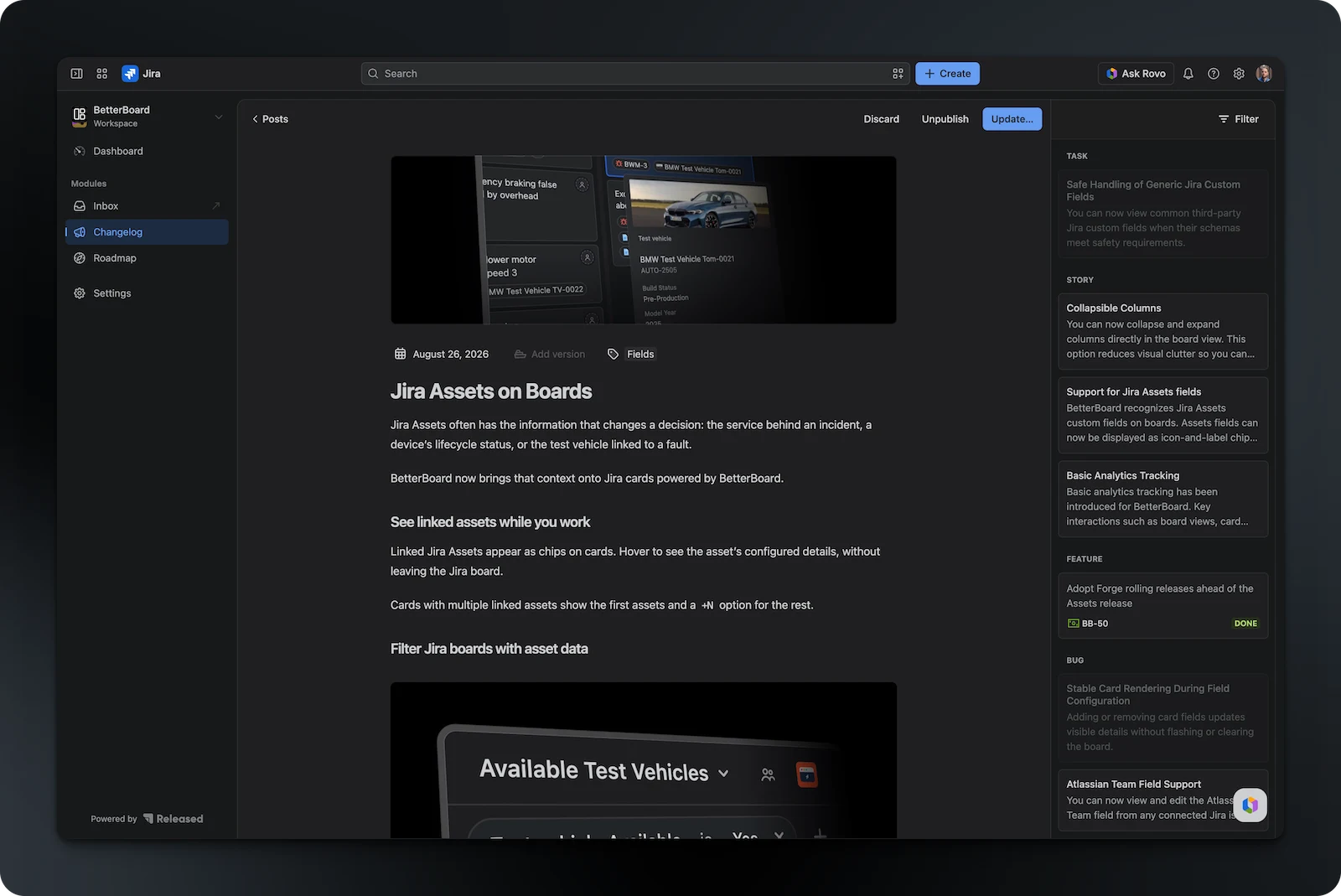
Released Hub supports this Jira-native flow: select completed work, draft and edit the customer update, then publish it to an announcement page, embedded widget, or Confluence. The team still decides what is safe to announce and reviews the final copy before it goes live.
A simple rule for deciding what to publish
If customers need to find the change later, add it to the changelog. If they need to understand or use it, add a release note with a benefit, visual, and next step. If they need to act, communicate directly as well. If the release needs a story beyond one feature, create a launch package around the same source of truth.
Common questions
Is an email enough for a product announcement?
Should every bug fix get its own release note?
When should a release become a broader launch?
Publish release notes your customers will read
Select shipped Jira work, turn it into a clear draft, and publish the approved update where customers will find it.