
Release notes examples and what to learn from them
Learn from five release notes examples, with practical lessons on customer-focused wording, availability, demonstrations and in-app delivery.
On this page
Seeing how other products explain a change can help you find the right approach for your own release notes. Look at how they make an improvement relevant to customers, give people enough detail to try it and choose where to deliver the update.
Product categories help readers find relevant updates. Version information tells them whether a change applies to the software they use. A short demonstration can show them how to try a new workflow.
These five release notes examples include screenshots and an analysis of the choices behind each announcement, with practical lessons to apply to your next update.
Shopify helps readers find the right product area
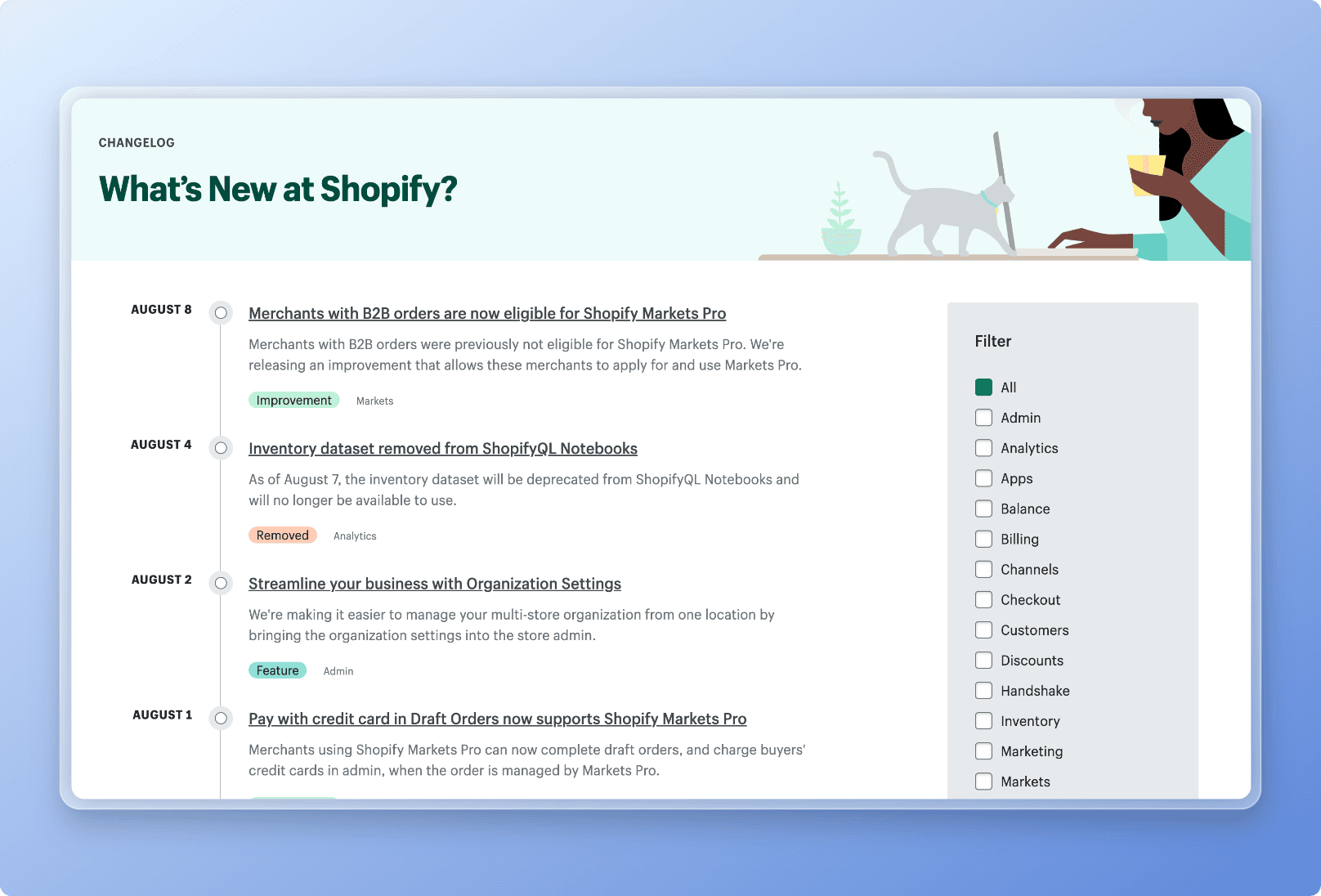
Shopify’s changelog uses a headline about merchants with B2B orders to tell readers who is affected and what changed: those merchants could now apply for Shopify Markets Pro. The paragraph beneath it explains the previous limitation and the new option.
That is a useful writing pattern when a change applies to a particular group. Name the affected customer or workflow in the title, then explain what they can do now. Someone scanning the changelog can recognise whether the update matters to them before opening the full entry.
The categories support that first decision. Change-type labels distinguish an improvement from a removal, while product-area filters help readers focus on Analytics, Checkout or another part of the product they use. The guide to organising release notes explores how to choose those categories.
For your next update, check whether the intended reader is visible in the headline or first sentence. A useful category helps them find the entry; clear wording helps them understand it.
UiPath makes versions and sections easy to navigate
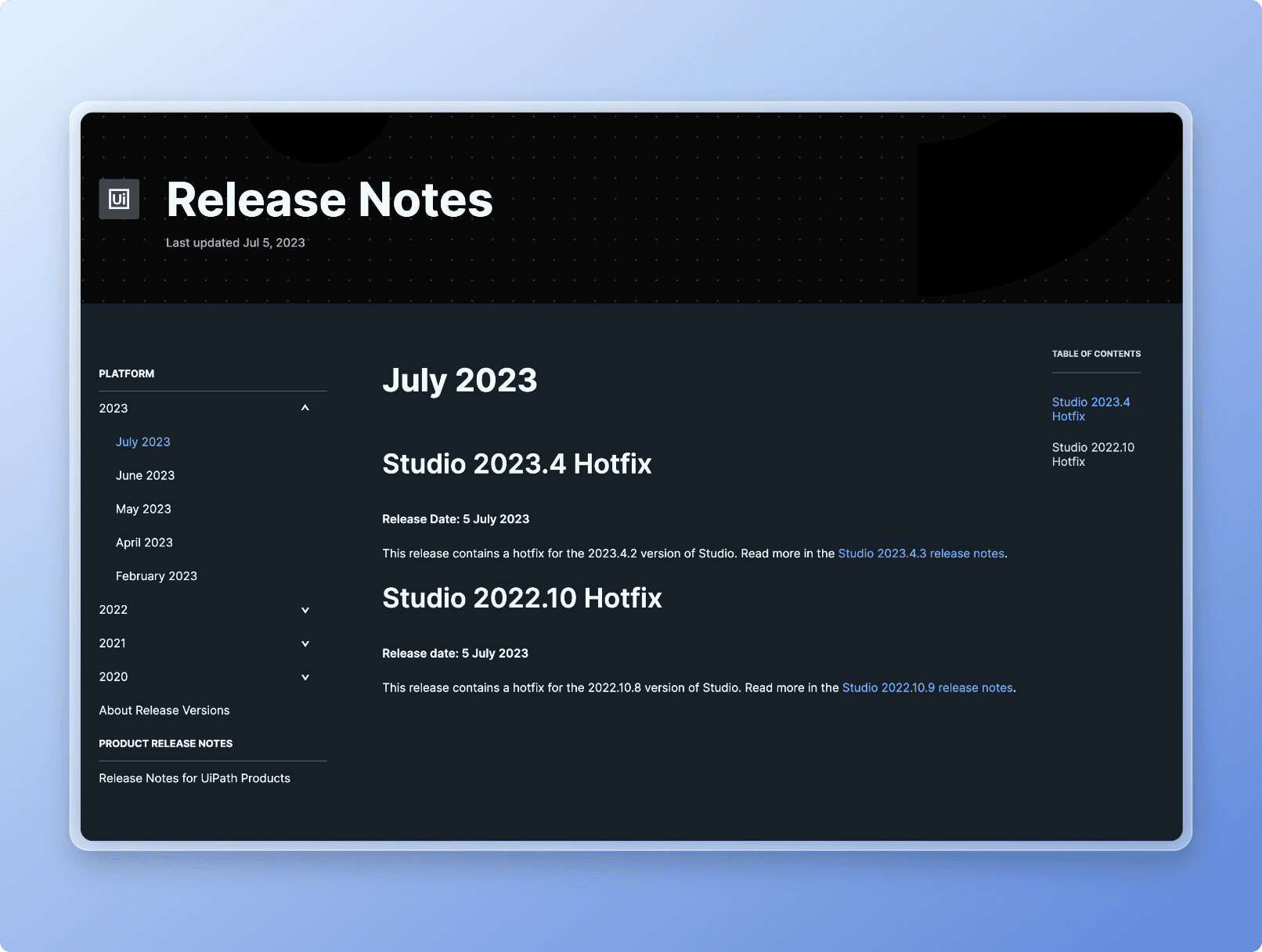
The UiPath release notes example answers a question that matters for installed software: which release does this information apply to? The version-specific hotfix headings and release dates sit beside an archive and a table of contents, giving readers several ways to locate the right update.
For a product manager communicating a fix, that context helps support teams and customers connect the announcement to the version they are using. For product marketing, it keeps a broader announcement from suggesting that every customer already has the same capabilities.
Use explicit version or rollout information when it changes what the reader can do. An enterprise product with several supported versions may need an archive like this. A continuously delivered SaaS product may need a short availability sentence in the affected entry instead.
The technique to borrow is making applicability easy to establish. Choose the navigation and detail that help your audience answer that question.
Loom combines the action with a demonstration
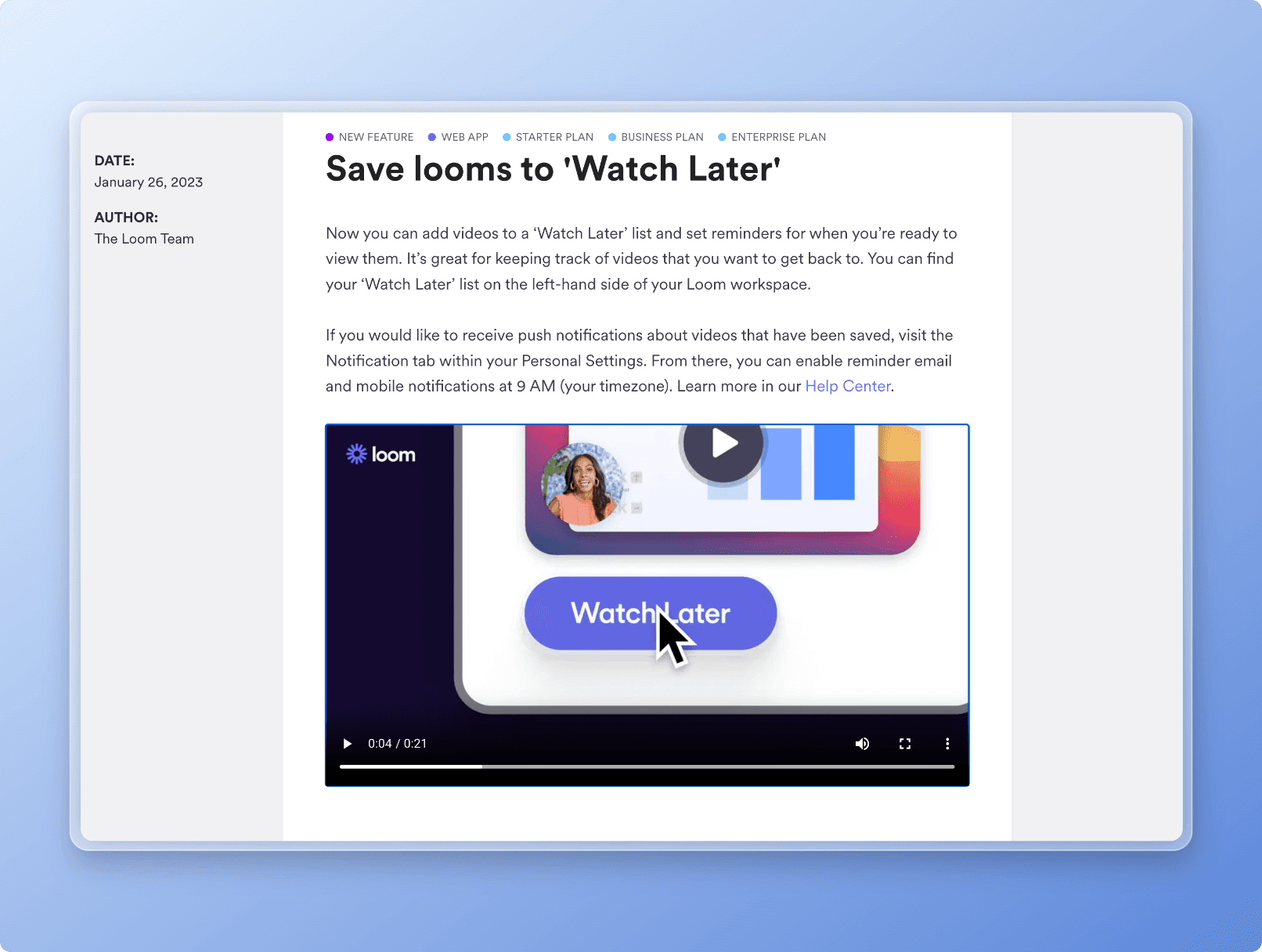
In Loom’s update, “Save looms to ‘Watch Later’” names an action the reader can take. The opening paragraph explains the benefit of keeping track of videos to return to, then says where to find the list. Further instructions cover reminders and link to the Help Center.
The short video demonstrates the interaction after the text has established why it is useful. Readers can understand the change and decide to try it without first playing a recording.
Borrow that order for a new workflow: name the action, explain its value, show where it happens and offer more help. A focused demonstration is especially useful when the interaction would take several sentences to describe.
Before recording a video, write the short explanation that will sit above it. That forces you to identify the main point and gives readers a useful update even when they cannot watch.
Help Scout shows what a new capability will do
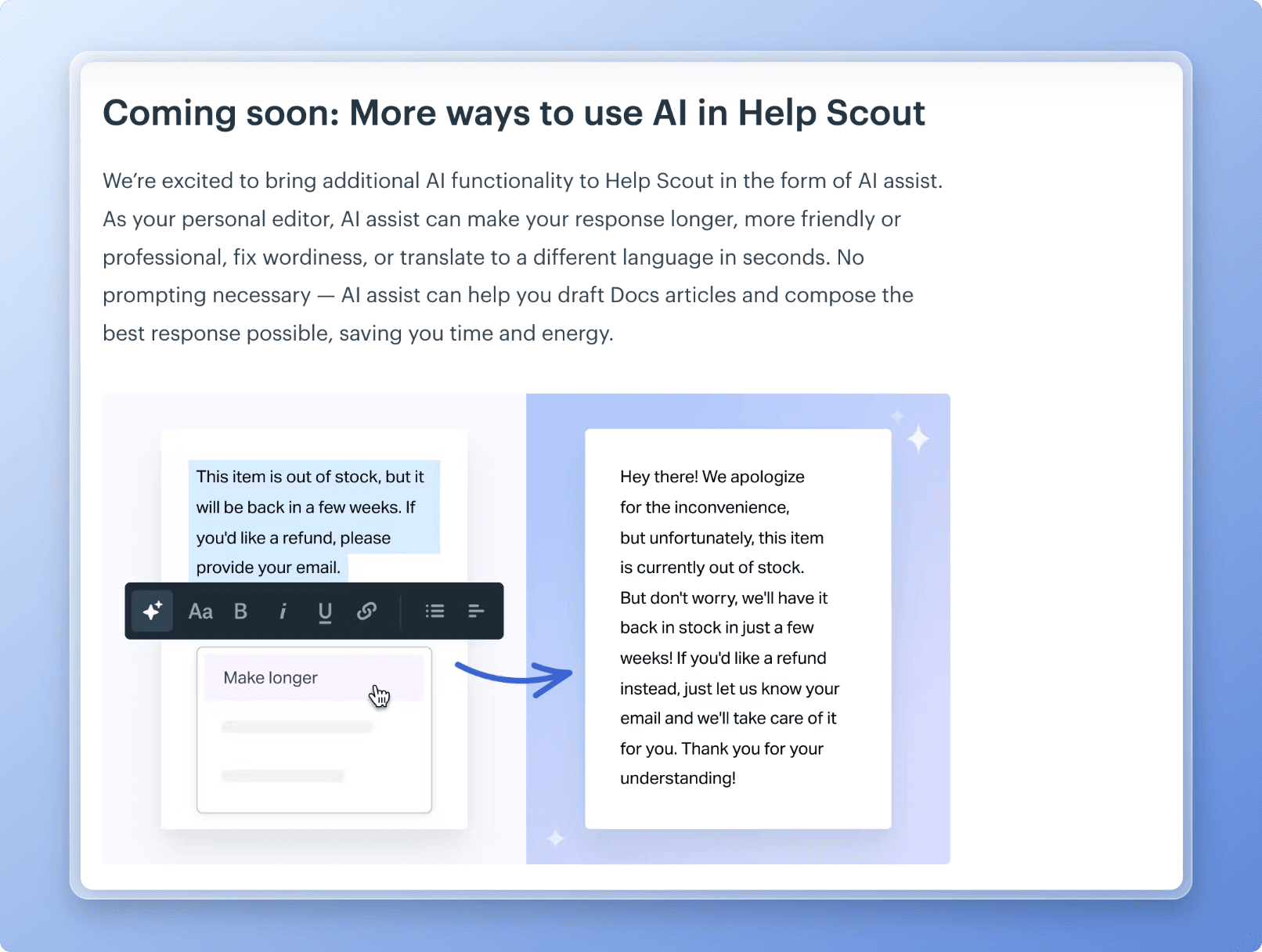
Help Scout introduces AI editing through recognisable tasks: changing the length or tone of a response, fixing wording and translating text. The before-and-after illustration then shows one of those actions applied to a support reply.
That combination makes a broad capability concrete. A reader can see the control, the original text and the resulting response, and connect the announcement to work they already do.
Use a before-and-after example when the benefit is a transformation: a clearer reply, a simpler report or a shorter process. Choose one representative task and show enough detail for the reader to judge the result.
This historical announcement is labelled “Coming soon”. Keep that distinction in your own updates: a preview should make its availability clear so readers know whether they can use the capability today.
A preview also gives you a chance to hear from customers before launch. Explain what is still being explored and tell readers where to send questions or feedback, so the announcement opens a useful conversation.
Released Hub puts the update inside the product
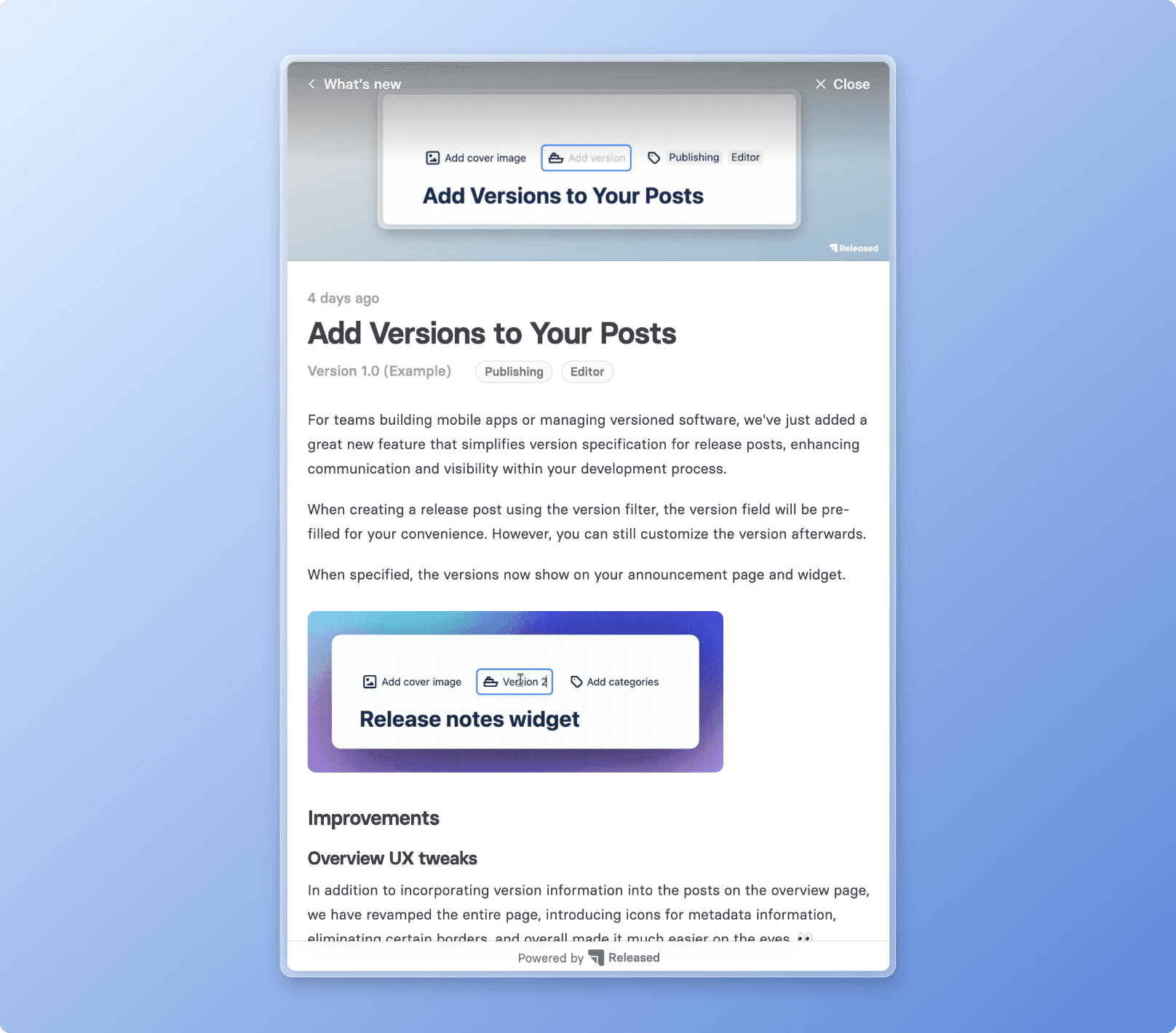
The Released Hub example shows an announcement in an in-app widget. Its title names the new action, the body explains how version information appears, and the supporting image shows the field involved.
The delivery choice matters. Someone using the product can discover the update in that context, while the full changelog provides a place to return for detail. Released Hub AI release notes covers the drafting and publishing workflow behind this kind of announcement.
There is a writing lesson here too. The opening could be tighter: phrases such as “great new feature” take space without explaining the change. Leading with what teams can now do with version information would make the value easier to recognise.
Use the example to consider where your audience should encounter an update. Keep the in-app message focused on a relevant change and provide a route to the full explanation.
Keep that experience recognisably yours. Use consistent colours, typography, imagery and language across the in-app message and full changelog. If an update supports a product principle your team talks about, explain the concrete connection rather than adding a generic statement about company values.
Apply one technique to your next announcement
Take a release note you are about to publish and read its headline and first paragraph on their own. Can the intended customer tell what changed, why it matters and whether it is available to them?
Fix the first unanswered question. Then decide whether a category, a version label, a demonstration or an in-app announcement would help that reader find and use the information. Add the element that solves the problem you have identified.
If several changes form a meaningful story, have product and product marketing shape it together. A short overview can connect those changes to a customer goal; the individual entries should still be easy to scan. The writing guide’s organisation step covers themes, grouping and navigation, while its next-step guidance covers supporting visuals and resources.
For help turning the draft into a finished update, follow how to write release notes. You can also copy a release notes template or use the Jira publishing guide when the underlying work is in Jira.
Publish release notes your customers will read
Select shipped Jira work, turn it into a clear draft, and publish the approved update where customers will find it.