
Productboard and Jira: When the Integration Adds Work
Productboard's Jira integration is capable. Learn when its mapping and sync controls are worth the work, and when a Jira-first communication layer is the simpler choice.
On this page
“Why is the roadmap still wrong?”
It is not a great question to hear after you have spent a week cleaning up Jira.
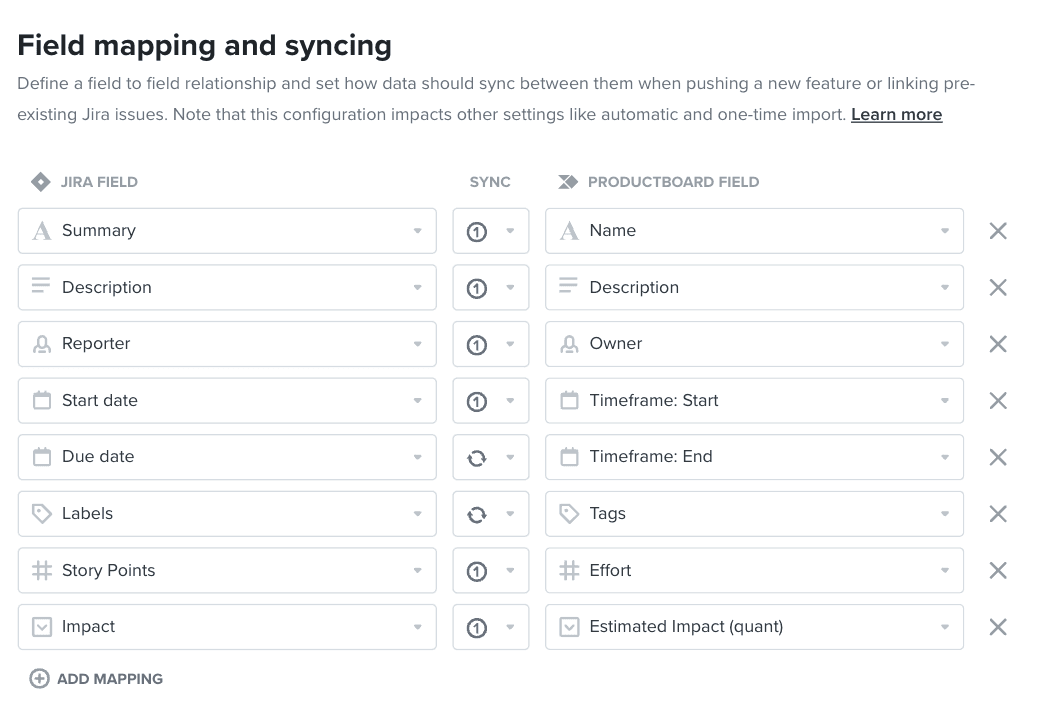
Productboard does integrate with Jira. Properly configured, it can push and link work, import issues, map standard and custom fields, synchronize selected fields, and update Productboard feature status from Jira status. That is useful for teams that genuinely need a separate product-management system.
The problem is not that the integration lacks capability. The problem is that it can become brittle as the two systems change: it is another workflow to design, own, and keep aligned.
The integration tax
Every field you map is a decision: which system owns it, which direction changes travel, who can change it, and what happens when the two systems disagree. Every new Jira project, custom field, status, release group, or permission model can reopen those decisions—and a neglected configuration can leave teams troubleshooting rather than planning.
For a product-ops team running a deliberate Productboard practice, that work can be worth it. Productboard offers the strategic planning and research workflow they want, and Jira is the delivery engine it connects to.
For a Jira-first team that mainly needs to collect customer feedback, share a current roadmap, and explain what shipped, it is often the wrong trade. You have created a second place that needs to represent work that already exists in Jira.
A quick test
Ask these questions before you add or renew the integration:
- Is Productboard the source of truth for strategy, or is Jira/JPD already doing that job?
- Which fields must stay synchronized, and which system wins when they conflict?
- Who owns the integration health, permissions, status mappings, and exceptions?
- Do customers and stakeholders need a product-management workspace, or a clear, curated view of the work already happening?
If the answers point to Productboard, use its integration deliberately. Give it an owner. Keep the field model tight. Do not map everything just because you can.
If the answers point to Jira, do not build a replica of Jira outside Jira. Keep planning and delivery in Jira or Jira Product Discovery. Then add the missing communication layer: a customer-facing roadmap, feedback portal, and release notes that are fed by the work your team already updates.
Productboard vs. Jira-native apps
| Maintenance Task | Productboard (External Sync) | Jira-Native App (Released) |
|---|---|---|
| Workflow ownership | Decide which fields and statuses synchronize, and who maintains the configuration. | Work from the Jira and JPD data the team already maintains. |
| Stakeholder communication | Create and maintain the view people outside the delivery workflow need. | Share selected Jira or JPD work as a customer-facing roadmap and release notes. |
| Access model | Operate Productboard permissions alongside Jira access. | Keep the planning workspace in Jira while sharing a curated portal externally. |
| Best fit | Teams that need a dedicated strategic product-management workspace. | Teams whose planning and delivery already happen in Jira. |
The practical split
Productboard is a strong choice when a company needs a dedicated strategic repository across complex portfolios and is prepared to operate it.
Jira and Jira Product Discovery are a strong choice when delivery and product planning already live in the Atlassian stack.
Released is for the next part: turning the parts of that work customers and stakeholders should see into a branded portal, without granting them access to the internal planning workspace.
That distinction matters. A roadmap is not useful because it contains every field. It is useful because the right people can understand it and trust that it reflects reality.
What to do next
Audit one active roadmap. Compare what customers can see with the actual Jira work behind it. If the two no longer line up, first decide which system should be authoritative. Then reduce the number of places that need to be updated.
If Jira is the answer, Released can turn that living source into a roadmap, feedback portal, and release notes your customers can use.