More board, less compromise.

Jira's company-managed board is powerful — but it still locks your columns to status. BetterBoard removes that ceiling without touching a single work item.

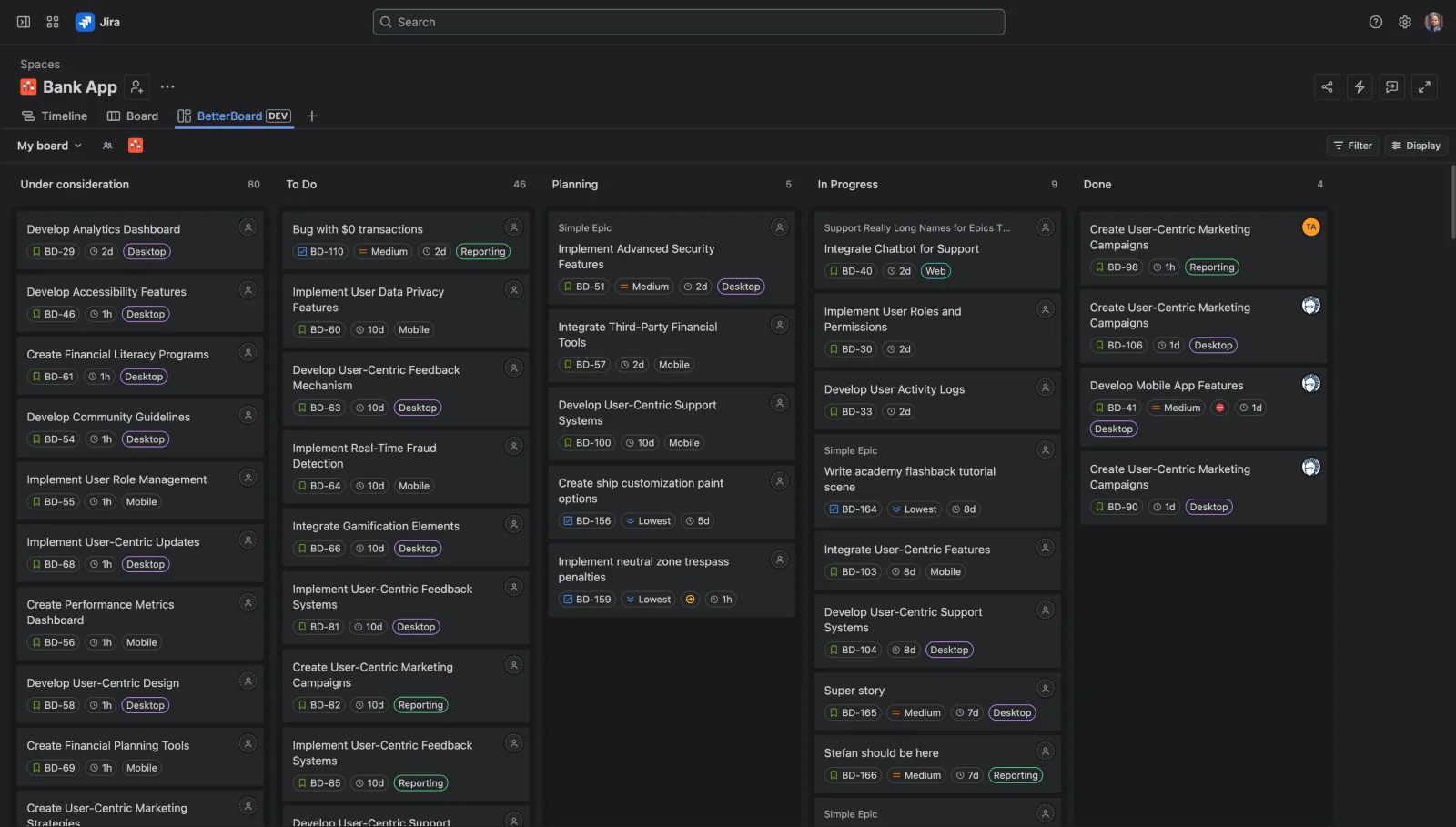
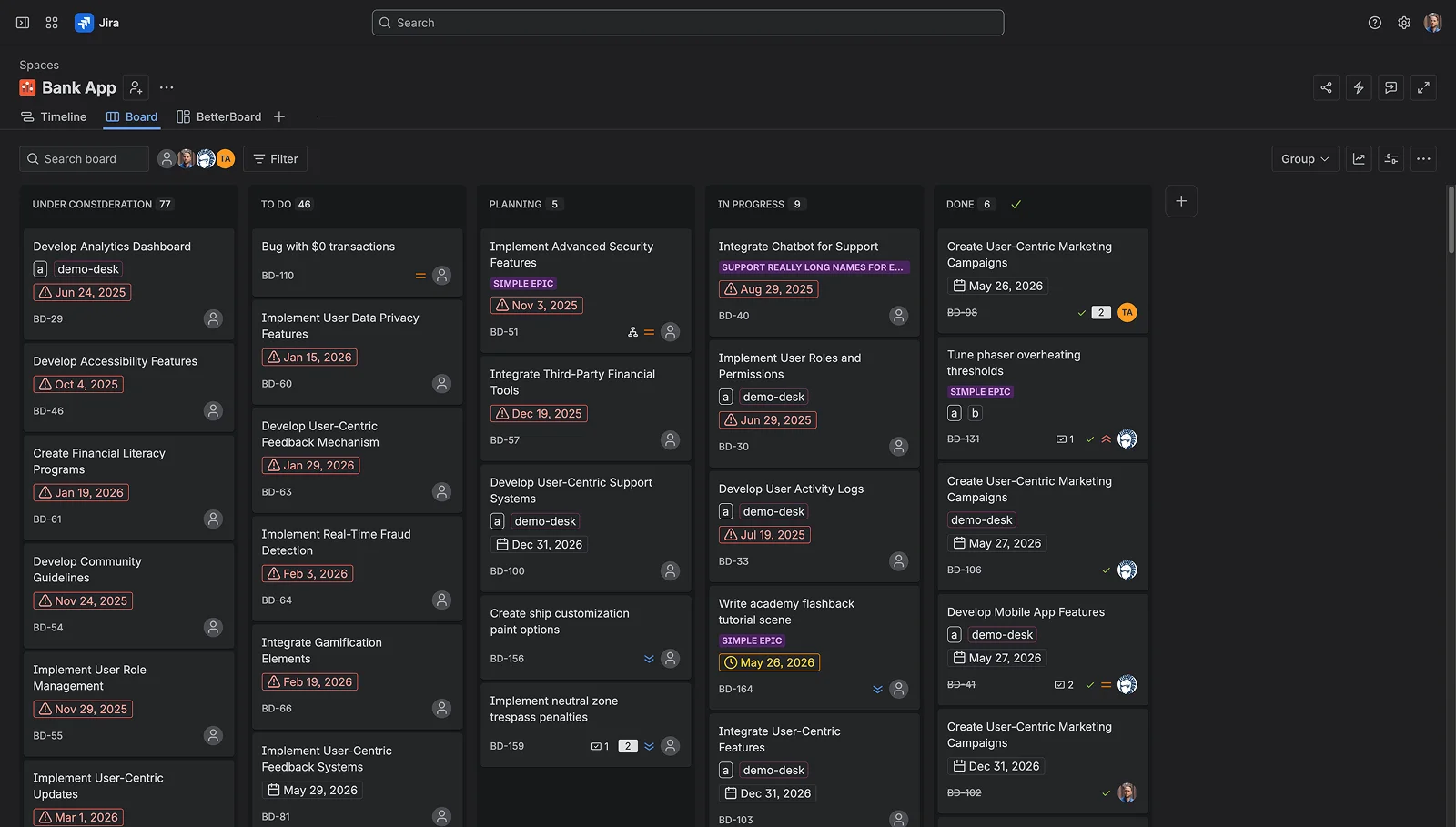
BetterBoard board view Jira company-managed board Jira Board BetterBoard

Built-in Jira board

Company-managed board

The full-featured Scrum and Kanban board for company-managed spaces. More configurable than team-managed, but columns remain tied to status.

  • Advantage: Multiple boards per space
  • Advantage: Quick filters with JQL
  • Advantage: Swimlanes by epic or assignee
  • Limitation: Columns locked to status only
  • Limitation: Cards capped at 3 extra fields beyond defaults
  • Limitation: Filters require admin setup and JQL knowledge
  • Limitation: Slows down past ~1,000 work items on the board

Forge app · one-click install

BetterBoard

A Forge-native board inside your existing Jira space — same work items, same permissions, no migration required.

  • Advantage: Group columns by any field, with swimlanes
  • Advantage: Configurable card fields, inline editable
  • Advantage: Bulk edit fields across multiple work items at once
  • Advantage: 25+ filter operators across every field
  • Advantage: Real-time sync — changes appear instantly
  • Advantage: Keyboard-first, full command palette

Everything side by side.

A complete breakdown of what each board supports — from basic columns to advanced power features. Hover any row to see details.

Supported Limited Not available
Feature Company-managed board Built-in Jira BetterBoard Forge app
Board basics
Multiple boards per space Create more than one board view for the same space
Supported: Multiple boards via board configuration
Supported: Unlimited boards, each with its own config
Multi-space board Pull work items from several spaces onto one board
Limited: Via board filter JQL — complex to configure
Supported: Multiple spaces on one board — simple UI
Private boards Boards visible only to you
Not available: Shared with space by default
Supported: Private or shared, per board
Real-time sync Board reflects Jira changes instantly across all open boards
Limited: Polls every ~30s, click banner to refresh
Supported: Live updates — no refresh banner
Large board performance How well the board handles many work items
Not available: Atlassian: boards slow past ~1,000 work items
Supported: Built for performance and scale
Columns & grouping
Column grouping field Choose what field drives the column structure
Not available: Status only
Supported: Any field — status, assignee, priority, sprint, or custom
Map multiple values to one column Consolidate several statuses into a single column
Supported: Multiple statuses per column
Supported: Map any number of values to one column
Swimlanes Horizontal grouping layer within columns
Limited: Epic, assignee, space, or JQL — fixed set
Supported: Group by any field as a swimlane
Reorder columns Drag columns into your preferred order
Supported: Supported
Supported: Drag columns into any order
Cards & fields
Choose fields on cards Control which fields appear on each card face
Not available: Hard cap of 3 extra fields beyond defaults
Supported: Any field — standard and custom, no cap
Inline field editing on card Update a field without opening the work item
Not available: Drawer required — Atlassian has no plans to expand
Supported: Click any field chip to edit in place
Bulk edit multiple work items Apply field changes to several cards at once
Limited: Hidden behind right-click → Bulk change
Supported: Select cards, apply changes via bulk action bar
Time in status See how long each work item has been in its current status
Limited: "Days in column" — counts weekends, no working hours
Supported: Time in status shown on each card
Sorting & ordering
Sort cards within columns Control work item order inside each column
Limited: Rank — changing ORDER BY in JQL breaks drag-rank
Supported: Sort by any field, multi-level
Manual drag-to-rank Reorder work items within a column by dragging
Supported: Supported
Supported: Supported — syncs to Jira rank
Filtering
Ad-hoc filtering on the board Filter without leaving the board or editing config
Not available: No — only pre-defined quick filters set via board admin
Supported: Filter on any field with 25+ operators, no JQL required
JQL knowledge required Need to know Jira's query language to set up filters
Not available: Every quick filter is a JQL snippet
Supported: Pick a field, pick an operator — no JQL required
WIP limits Per-column work-in-progress caps
Limited: Visual only — don't block moves, hidden on wide boards
Not available: Not currently supported
Power features
Keyboard shortcuts Navigate and update work items without a mouse
Limited: Basic navigation shortcuts only
Supported: Full keyboard nav + command palette (⌘K)
Compatibility & trust
Works without installation
Supported: Built into Jira
Limited: One-click install from the Marketplace
Data stays in your Jira tenant
Supported: Atlassian-hosted
Supported: Atlassian Forge — runs entirely in your tenant

Boards & columns

Company-managed boards added swimlanes and multiple board configurations — but columns are still tied to status. BetterBoard lets you group by priority, assignee, sprint, component, or any custom option field. Drag an work item between columns and the field updates in Jira automatically.

Unlimited boards per space

One board per team, per workflow, per stakeholder — each with its own column setup, card fields, filters, and sort order.

Multi-space boards

Combine work items from multiple Jira spaces on a single board with a simple UI — no JQL required. Useful for cross-functional teams spanning software, service management, and product discovery.

Status mapping

When grouping by status, merge multiple statuses into one column — combine In Review and Waiting for Feedback so your board stays readable.

Cards & editing

Jira caps card layouts at three extra fields beyond the defaults — and won't make those fields inline-editable. BetterBoard lets you put any field on the card and edit it in place. Select multiple work items to bulk-update fields without right-clicking through a hidden menu.

No 3-field cap

Surface every field that matters on the card — assignee, priority, labels, story points, due date, time tracked, or any custom field. Not just three.

Inline editing on every field

Click any field chip to edit in place — status, assignee, priority, labels, custom fields. No drawer required. Atlassian has explicitly said there are no plans to add this to Jira.

Drag to update

Drag an work item to a different column and the underlying field updates automatically in Jira. No extra clicks, no confirmation dialogs.

Filters & sorting

Jira's quick filters look easy until you try to make one — every filter is a JQL snippet, set up in the board admin, by someone who knows the query language. BetterBoard lets anyone filter on any field with 25+ operators, right from the board, without writing a single line of JQL.

A board per view

Create a separate board for each filter configuration or team view. Each board keeps its own column setup, fields, and filters — so different workflows get their own dedicated space.

Time in status

See how long each work item has sat in its current status — not just days in column. Spot bottlenecks and ageing work at a glance, without leaving the board.

Sort by any field

Order work items within columns by due date, priority, story points, or any custom field. Stack multiple sort levels to get exactly the order your workflow needs.

Your Jira space, exactly as it is. BetterBoard is just a better window into it.

No migration. No duplicate data. No new process to learn. Your work items, your fields, your workflows — shown the way you want them.

Ready to see the difference?

Free for teams up to 10 users. Includes a 30-day free trial. Install in one click from the Atlassian Marketplace.

Install BetterBoard free