All comparisons

Canny vs ProdPad

Canny suits small teams that want a dedicated feedback and product-planning system with customer voting, segmentation, and automatic feedback capture. ProdPad suits product teams that want dedicated discovery, feedback evidence, idea management, and outcome-led now, next, later roadmaps before delivery starts.

Canny

Best for small teams with a dedicated feedback system

  • Advantage: Customer requests, votes, and discussions in one portal
  • Advantage: Customer segmentation and revenue context for prioritisation
  • Advantage: Automatic feedback capture and deduplication with Autopilot
  • Limitation: Internal idea fields cannot appear on the public portal
  • Limitation: Replies to notification emails do not become post comments

ProdPad

Best for outcome-led product discovery

  • Advantage: Feedback evidence linked to ideas, initiatives, and objectives
  • Advantage: Outcome-led now, next, later and portfolio roadmaps
  • Advantage: AI theme analysis and automatic feedback-to-idea linking
  • Limitation: Roadmaps, Ideas, and Feedback are purchased as separate modules
  • Limitation: Jira full sync requires Ideas Advanced

Feature comparison

✓ Supported · — Partially supported · × Not available.

Feature Canny ProdPad
Pricing
Free plan and limits Compare the limits and scope of the free offering.
Supported 25 tracked users
Not available
Starting paid price Compare the entry paid plan, billing unit, and payment commitment. Free-plan limits are listed separately.
Pro: from $79/month, billed annually (100 tracked users)
Not available
Pricing model Understand what drives the bill, such as seats, site size, or tracked users.
Your company pays for Canny based on the number of people whose feedback is tracked. Customers do not pay to submit feedback.
Teams choose Roadmaps, Ideas, and Feedback modules and pay per editor; reviewers are unlimited and free.
Feedback collection and organisation
Feedback collection Collect ideas, requests, and problems from customers.
Supported
Supported
Feedback triage Review incoming feedback and organise it for follow-up.
Supported
Supported
End-user feedback portal Give customers a dedicated place to submit and browse feedback.
Supported
Supported
Respond to feedback Respond to customers and continue the feedback conversation.
Supported
Supported
Reply to feedback directly by email Record a customer’s email reply in the feedback thread without requiring a portal visit.
Not available
Not available
Feedback visibility controls Control whether feedback is private or visible to other customers.
Supported Custom access: Pro/Business
Not available
Dedicated feedback forms Collect feedback through a dedicated form embedded in a website or app.
Not available
Supported
Automatic feedback capture Extract feedback from connected conversations without manually creating each entry.
Supported
Supported
Comments and discussions Discuss a request and add context in a shared conversation.
Supported
Supported
Private internal notes Keep team discussion separate from customer-visible replies.
Supported
Not available
Prioritisation and customer context
Wishlists and customer voting Understand which requests matter to customers through votes or personal selections.
Supported
Supported
Personal customer wishlists Let customers maintain a personal selection of the features they want.
Not available
Not available
Configurable wishlist limits Limit customer selections so they must choose what matters most.
Not available
Not available
Hide demand counts Hide totals to reduce the influence of other customers’ choices.
Supported
Not available
Customer segmentation Analyse feedback from particular customer groups.
Supported
Supported
Revenue-based prioritisation Consider account revenue when assessing customer demand.
Supported
Not available
Custom scoring frameworks Score requests using criteria chosen by the team.
Supported
Supported
Prioritisation models Use formulas such as RICE or impact versus effort to compare priorities.
Supported
Supported
Roadmap views and sharing
Public roadmaps Share upcoming work and progress with customers or stakeholders.
Supported Custom columns: Pro/Business
Supported
Board roadmap view Organise roadmap items into columns by status or planning stage.
Supported
Supported
Timeline view Show planned work against dates on a timeline.
Not available
Limited Roadmap items can carry day, month, or quarter dates in customised views, while the core method remains now, next, later.
Roadmaps across multiple projects Bring work from multiple projects into one shared roadmap.
Not available
Supported
Advanced roadmap filtering Choose which work appears using filters or advanced queries.
Not available
Supported
Separate customer-facing descriptions Write a customer-facing explanation separately from the internal planning description.
Not available
Supported
Show planning fields on the public roadmap Choose which internal planning fields customers can see on published items.
Not available
Not available
Control over roadmap publishing Decide when internal changes become visible to customers.
Supported
Supported
Release communication
Release notes Publish updates that explain what has changed in the product.
Supported
Not available
Release-note drafting workflow Compare where AI drafting happens and how source material reaches the writer.
External AI assistant through MCP on Pro/Business; built-in drafting unverified
Not available
Reusable release-note templates Reuse an agreed structure when preparing each product update.
Not available
Not available
Configurable AI writing instructions Guide generated writing with tone, examples, or custom instructions.
Not available
Not available
Embedded product updates Show product updates directly inside a website or application.
Supported
Not available
Changelog email subscriptions Let readers subscribe to product updates by email.
Supported Pro/Business
Not available
Shipment communication Tell customers when new work becomes available.
Supported
Not available
Request-specific status notifications Notify people about progress on the particular requests they follow.
Supported
Supported
Integrations
Jira integration Connect customer feedback and plans to delivery work in Jira.
Limited One Jira issue per idea; configured links and status mappings on Pro/Business
Supported
Website and app embeds Bring customer-facing content into an existing website or application.
Supported
Not available
Support tool integrations Bring feedback from support conversations into the product workflow.
Not available
Supported
Team chat integrations Connect team chat to feedback collection or notifications.
Not available
Supported
Publishing integrations Distribute product updates to other tools and channels.
Not available
Not available
API and webhooks Read or update data programmatically and react to product events.
Supported
Supported
Access and administration
Audience controls Choose which customers, teams, or individuals can access shared content.
Supported Pro/Business
Supported
External customer participation Let customers contribute without requiring an internal team licence.
Not available
Supported
Custom domains Publish customer-facing content under a domain your organisation controls.
Not available
Not available
SOC 2 compliance Assess the product’s documented SOC 2 compliance status.
Not available
Supported
Single sign-on Let users sign in through an existing identity provider.
Not available
Supported
Team roles and permissions Assign team members different responsibilities and access levels.
Not available
Supported

Canny

Best for small teams that want a dedicated feedback and product-planning system, with customer voting, structured ideas, prioritisation, and progress updates.

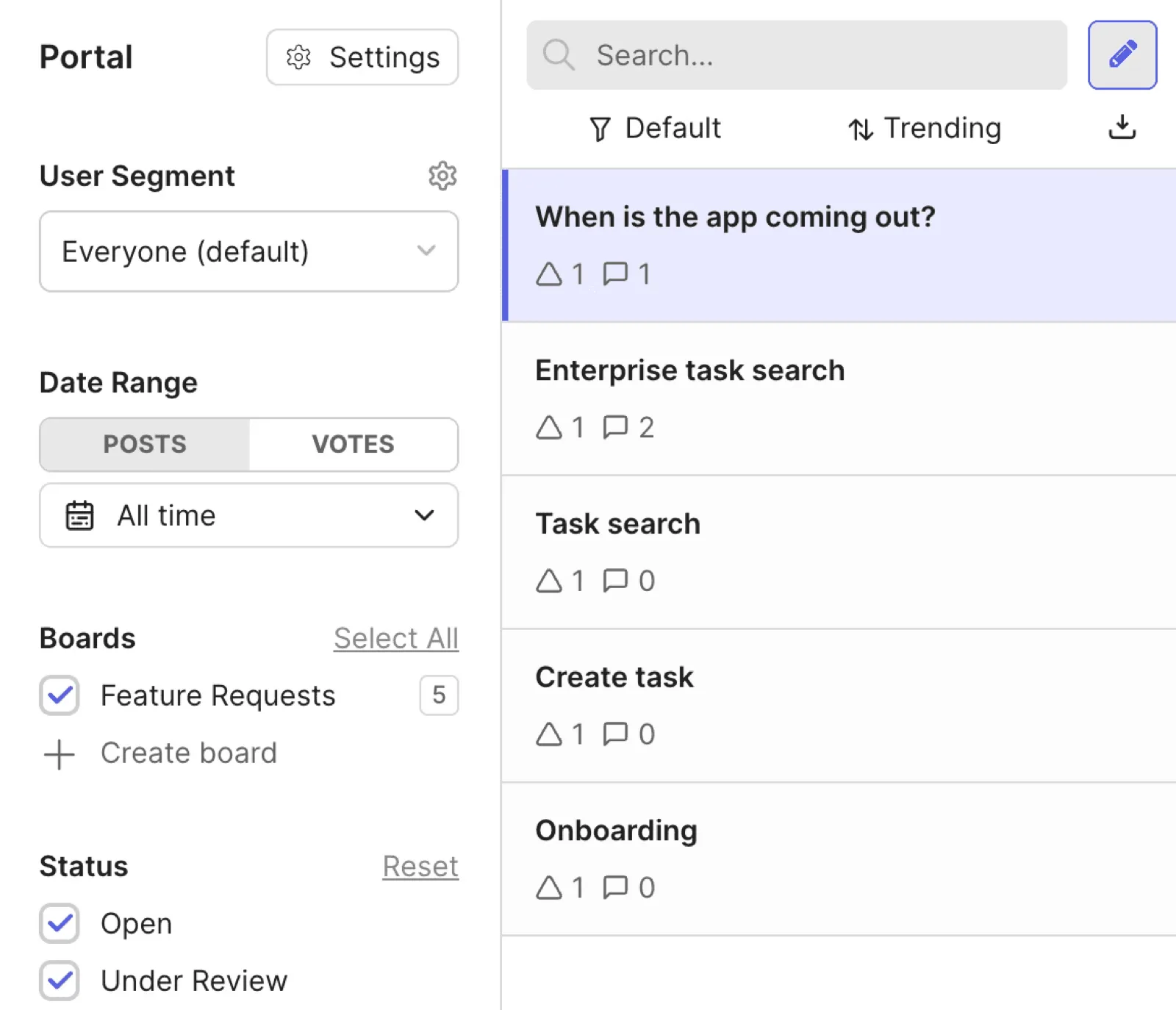
Canny feedback portal with feature requests, votes, and filters
Canny’s feedback portal brings requests, votes, and filters into one view.

Customer voting and discussion

Canny is a strong fit for small teams that want customer requests, votes, and discussions in a dedicated feedback portal. These interactions keep expressions of demand and the conversation around a request together.

Structured idea organisation

Canny supports teams that need to organise a growing collection of requests. Related ideas can be grouped, with customer evidence attached as insights so the context remains available during evaluation.

Customer segmentation and revenue context

Canny is particularly useful when demand needs to be assessed by customer group or commercial impact. Segmentation and revenue context help teams distinguish broadly popular requests from those important to particular accounts.

Automated feedback capture

Canny’s Autopilot reduces manual feedback intake by capturing and deduplicating feedback from connected sources. This is useful when customer input is spread across conversations; Autopilot is included across plans, with pricing based on tracked users.

ProdPad

Best for product teams that want dedicated discovery, feedback evidence, idea management, and outcome-led now, next, later roadmaps before delivery starts.

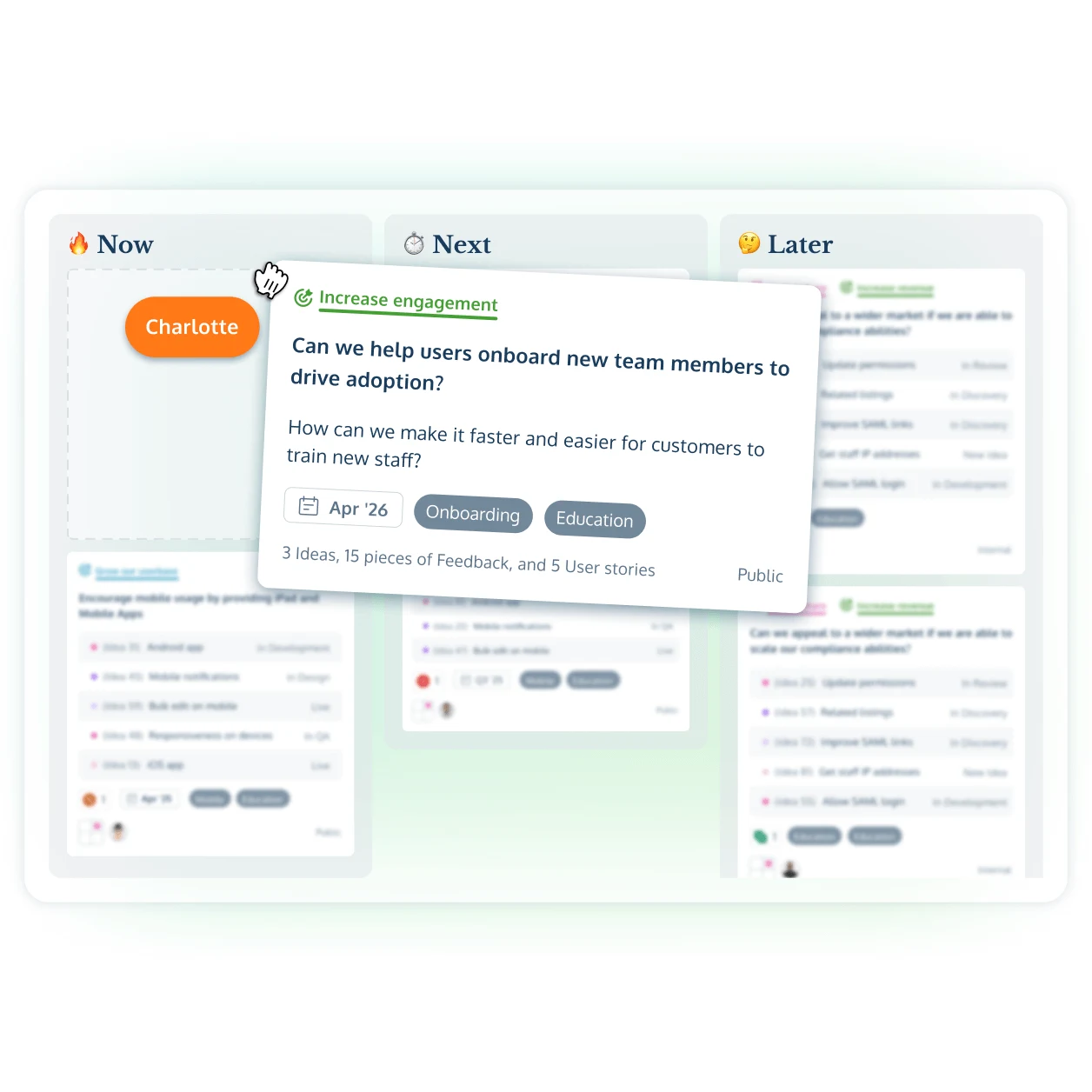
ProdPad now, next, later roadmap with an initiative card
ProdPad connects feedback and ideas to outcome-led now, next, later roadmaps.

Evidence-led discovery

Connect customer feedback to ideas, initiatives, objectives, and product decisions.

Now, next, later roadmaps

Communicate outcomes and strategic direction without turning every item into a dated commitment.

AI-assisted feedback analysis

Surface recurring themes and automatically connect relevant feedback to ideas.

Jira full sync

Map initiatives, ideas, user stories, fields, and workflow stages to Jira Cloud.

Key differences

Capability
Canny
ProdPad

Customer demand and prioritisation

Look beyond vote totals to understand which requests matter, who needs them, and how they inform priorities.

Canny supports custom formulas and weighted impact-versus-effort scores. Feedback can be segmented by customer attributes and assessed by revenue impact.

Ideas can be scored by impact and connected to customer feedback, objectives, and product strategy. Feedback filters, tags, company records, and customer context support segmentation, so teams can examine the evidence behind an idea as well as its score.

Roadmap presentation and publishing

Compare the context customers can see and the control your team has over sharing plans and progress.

A status-column roadmap shows posts from boards the viewer can access. Custom columns and statuses require Pro or Business. Internal idea fields cannot be shown to end-users on the portal. Internal ideas can remain private until published; idea-to-post status syncing is configurable.

ProdPad uses outcome-focused now, next, later roadmaps, with tailored views that can be published for different stakeholder audiences.

Advanced packaging adds product lines and portfolio roadmaps across multiple products. Items can carry dates in customised views, while the core roadmap structure remains now, next, later.

Feedback collection and conversations

Consider how easily customers can share feedback and continue the conversation with your team.

Groups and ideas support nested organisation, with customer evidence attached as insights. Customers submit, vote on, and discuss requests in a hosted feedback portal. Autopilot captures and deduplicates feedback; it is included across plans.

Teams can organise, tag, filter, segment, and link feedback to ideas and initiatives. Feedback arrives through branded portals, widgets, email, Slack, CRM, support tools, and team entry. CoPilot PM automatically links related feedback to ideas, while Signals surfaces recurring themes from live feedback.

Jira integration and administration

Look at how feedback connects to Jira work and what your team needs to manage across the two tools.

Canny connects ideas to Jira with configured links and status mappings, subject to a one-issue-per-idea limit. The integration requires Pro or Business. Merging ideas drops the merged idea’s links; migrated one-to-many links do not synchronise status.

Mapped two-way Jira status sync works for current Ideas within the documented linking constraints. Canny workspace permissions are managed through its own Contributor, Manager, and Owner roles.

Ideas Advanced provides Jira Cloud full sync for initiatives, ideas, user stories, and Jira work items. Jira statuses map to ProdPad workflow stages, with Jira changes reflected in ProdPad. ProdPad maintains its own editor and reviewer roles, alongside Jira OAuth and integration-owner permissions.